



You can follow the steps for JSS to Content SDK upgrade using many guides online, but later when you try to test your site locally or when deploying to Netlify or Vercel, you may face several hindrances. This guide was prepared to help you skip those issues and proceed smoothly with a full deployment and testing process.
Step-by-Step Guide to Upgrade from JSS to Content SDK
- Step 1. Download the latest vanilla Content SDK using npx create-content-sdk-app@latest nextjs. Let this be the source.
- Step 2. Create a branch from the existing JSS SDK application repository that needs to be upgraded. Let this be the target.
- Step 3. Upgrade the package.json file in the target by merging the content from the source package.json, updating dependency versions compatible with the application.
- Step 4. Merge the scripts section as well to ensure the latest scripts from the source package.json are maintained.
- Step 5. Clean up the package.json file by removing legacy configuration and keeping only essential locales. Example:
"config": {
"locales": [
"en"
]
}
- Step 6. Update the scripts in package.json to include:
"build": "cross-env NODE_ENV=production npm-run-all --serial bootstrap ensure-sitecore-dir sitecore-tools:generate-map generate-sitecore-files next:build",
"ensure-sitecore-dir": "ts-node scripts/ensure-sitecore-dir.ts",
"generate-sitecore-files": "ts-node scripts/generate-sitecore-files.ts"
- Step 7. Within the target scripts folder, add a file named ensure-sitecore-dir.ts.
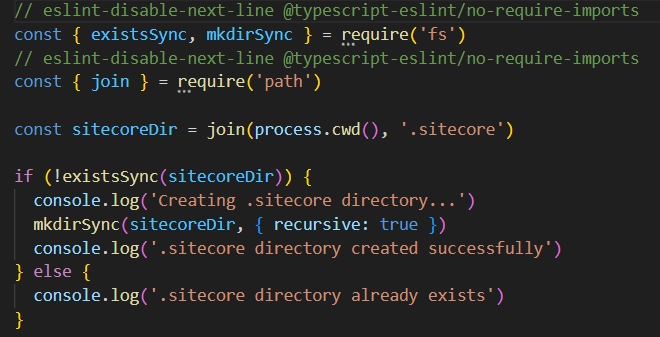
- Step 8. Within the scripts folder, add another file named generate-sitecore-files.ts containing your site information.
For example, the configuration for an XMC Accelerator DEV setup includes metadata generation, site configuration, and import map generation.
const { existsSync: fileExists, writeFileSync: writeFile } = require('fs')
const { join: pathJoin } = require('path')
const sitecorePath = pathJoin(process.cwd(), '.sitecore')
// Generate metadata.json
const metadata = {
version: '1.0.0',
generated: new Date().toISOString(),
components: [],
}
// Generate sites.json
const sites = {
defaultSite: process.env.NEXT_PUBLIC_DEFAULT_SITE_NAME || 'xcentium',
sites: [
{ name: 'Default', host: 'localhost', language: 'en' },
{ name: '[YOUR SITE NAME]', host: '[YOUR DEPLOYED SITE URL]', language: 'en' }
]
}
// Generate import-map.ts
const importMap = `// Auto-generated import map for Sitecore components export const componentMap = { // Component mappings will be populated by generate-map } export default componentMap`
// Write files
if (!fileExists(pathJoin(sitecorePath, 'metadata.json'))) {
writeFile(pathJoin(sitecorePath, 'metadata.json'), JSON.stringify(metadata, null, 2))
}
if (!fileExists(pathJoin(sitecorePath, 'sites.json'))) {
writeFile(pathJoin(sitecorePath, 'sites.json'), JSON.stringify(sites, null, 2))
}
if (!fileExists(pathJoin(sitecorePath, 'import-map.ts'))) {
writeFile(pathJoin(sitecorePath, 'import-map.ts'), importMap)
}
console.log('Sitecore files generated successfully')
- Step 9. Ensure the .env file contains Content SDK variables:
SITECORE_EDGE_CONTEXT_ID
NEXT_PUBLIC_SITECORE_EDGE_CONTEXT_ID
NEXT_PUBLIC_DEFAULT_SITE_NAME
SITECORE_EDITING_SECRET
- Step 10. Merge contents of next.config.js from source to target and include:
outputFileTracingRoot: process.cwd()
- Step 11. In _app.tsx, import all CSS files used by the application:
import 'src/assets/main.coveo.css'
import 'src/assets/main.default.css'
- Step 12. Add a bootstrap.ts file in the scripts folder.
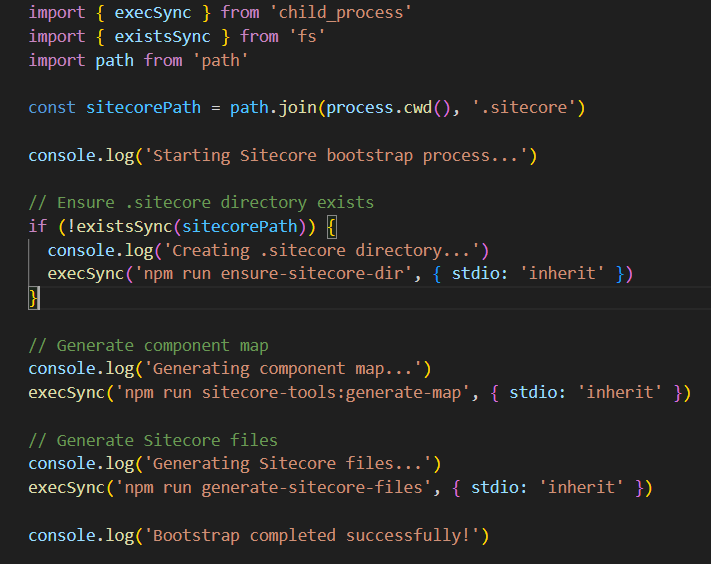
- Step 13. Update the sitecore.config.ts file.
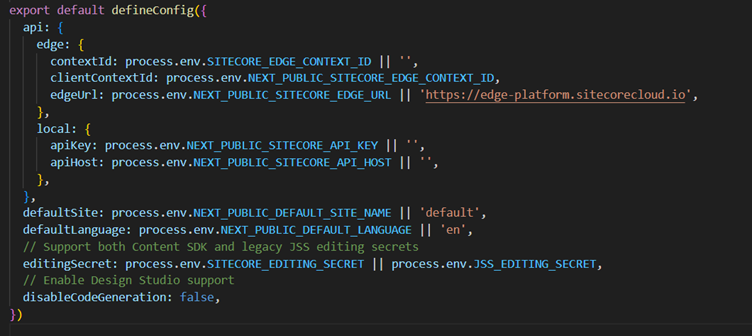
- Step 14. In files like [[..path]].tsx, 404.tsx, 500.tsx, and Layout.tsx, remove all usages of headLinks.
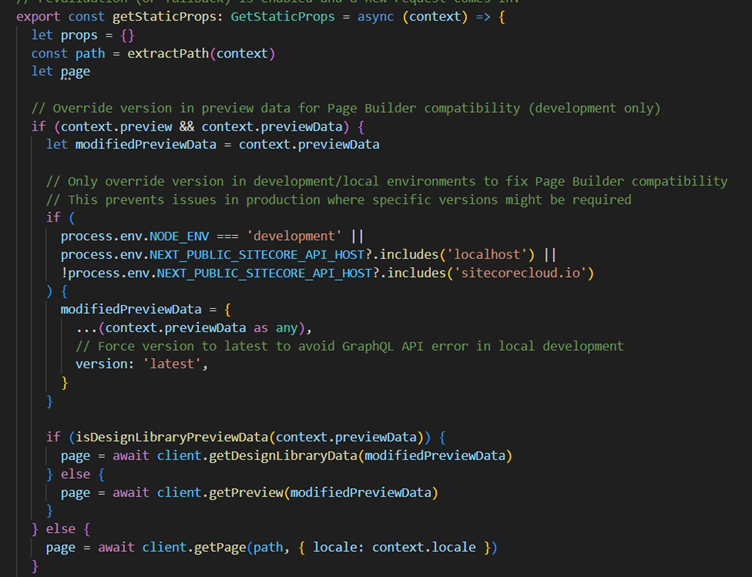
- Step 15. Merge the contents of tsconfig.json from source to target.
- Step 16. Update src/pages/api/editing/config.ts before instantiating EditingConfigMiddleware.
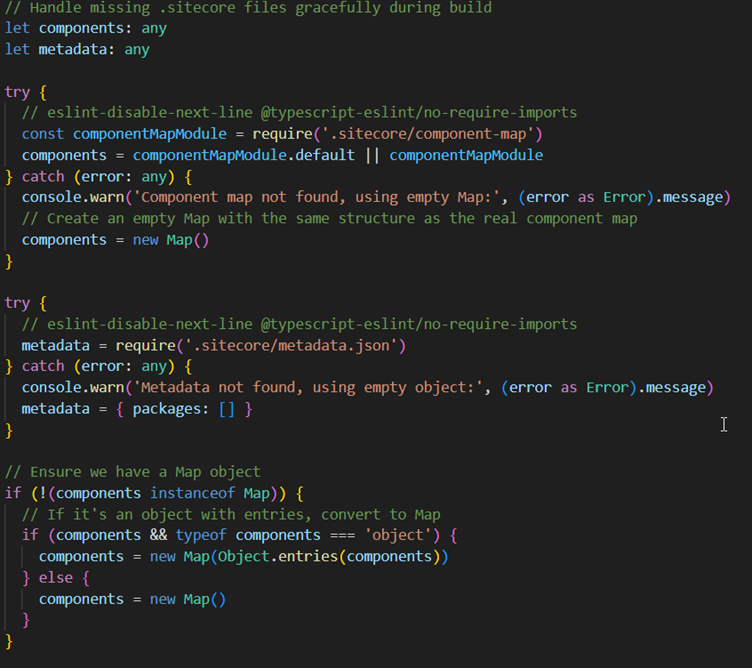
- Step 17. Update src/pages/api/robots.ts before instantiating RobotsMiddleware.
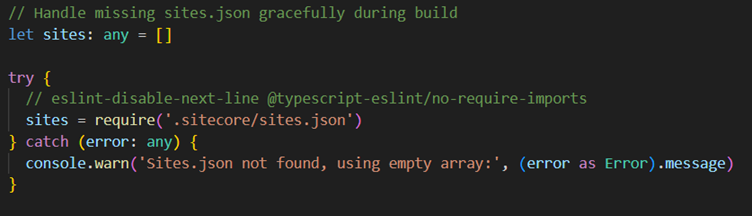
- Step 18. Update src/pages/api/sitemap.ts before instantiating SitemapMiddleware.
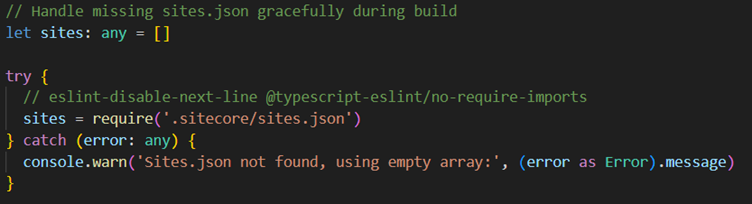
- Step 19. Upgrade any standalone modules with their own package.json files.
- Step 20. You may need to disable strict ESLint rules temporarily (for example, usage of any).
- Step 21. Upgrade all components in /src/components to use Content SDK.
- Step 22. Move CSS usage inline using Tailwind classes to improve maintainability.
- Step 23. Remove unused files once component references are fully inlined.
- Step 24. Content SDK requires exact casing for Sitecore field names (e.g., Name, Title).
- Step 25. Ensure variant wrappers are implemented inside each variant component.
- Step 26. Resolve remaining build errors using official documentation.
- Step 27. Verify utility libraries also use Content SDK.
- Step 28. Delete unused legacy files from the earlier JSS solution.
- Step 29. Build and run the upgraded project locally and test all pages.
Conclusion
After completing all these steps, your site should now be fully upgraded to the Content SDK. You should be able to run and test it locally and deploy it successfully to your rendering host such as Netlify or Vercel.
Following this structured upgrade approach helps avoid common issues developers encounter when migrating from JSS to Content SDK, ensuring a smoother transition and more stable deployments.