


If you've ever been handed a Figma file and told to write up a Business Requirements Document, you know the drill. You have to click through every single frame of UI and decide what the designer intended and what features should be included. This is exactly the type of work AI is great at. It's slow, it's repetitive, and it's the kind of work that eats up a BA or PM's entire week. It's also the kind of work that slows down progress and that nobody enjoys doing. This is where AI can step in, save the day, and give your BA or PM their week back to focus on more important tasks.
With everything going on with AI in development today, it can sometimes feel like everyone is trying to use it everywhere they possibly can. The problem with that approach is that AI isn't perfect at everything, even when it sometimes seems like it is. What AI is good at is taking care of simple, repetitive, mundane tasks and freeing up employees to focus on more creative and important work.
Introduction
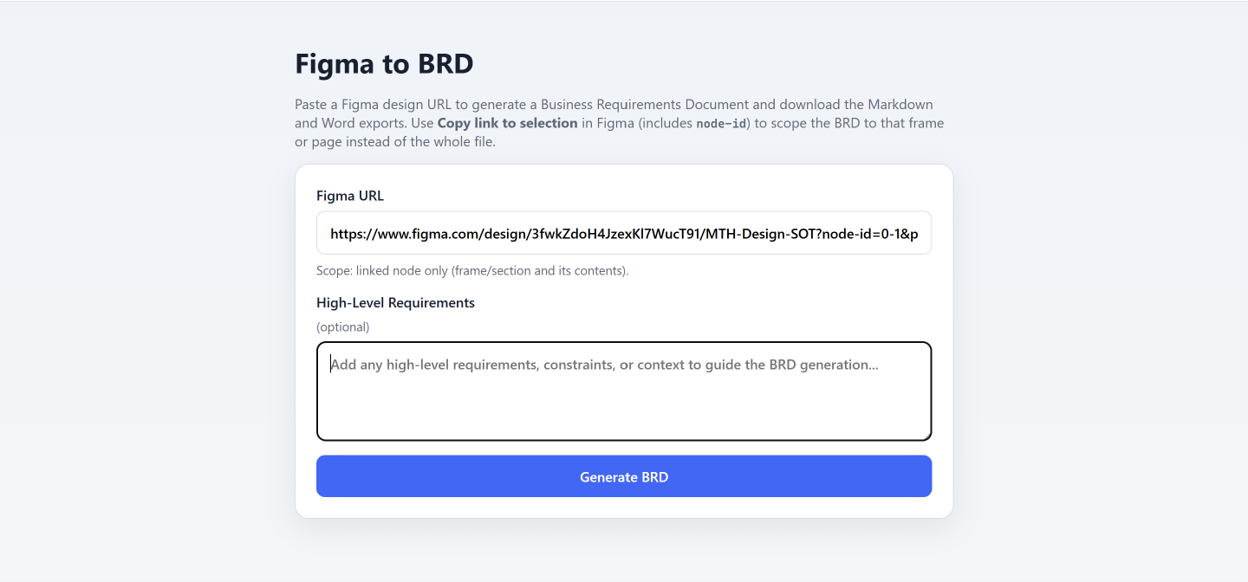
Here at XCentium, we built an internal tool that takes a Figma design link and generates a structured first-draft Business Requirements Document (BRD). You paste in a Figma URL of either an entire design file or a specific frame and optionally add any high-level context or project constraints. The tool reads the file's pages and frames directly through the Figma API, filters out anything that appears archived or deprecated, and walks through the structure exactly as a Business Analyst would—identifying user flows, interface states, and user interactions.
The AI-Powered BRD Generator
The image below shows the interface where users provide:
- Figma Design URL
- Design Scope
- Optional High-Level Requirements
The application then generates a Business Requirements Document in both Markdown and Microsoft Word formats.
Automatically Generating a Structured BRD
From there, the application produces a complete Business Requirements Document using the same structure that a Business Analyst would typically create manually.
- Overall Description
- Project Overview
- Product Features
- User Classes and Characteristics
- Constraints
- Assumptions, Dependencies and Risks
- System Features
- External Interface Requirements
- Reporting Requirements
- Nonfunctional Requirements
Every generated feature includes its priority, feature description, action sequence, functional requirements written as "system shall" statements, and a confidence rating (High, Medium or Low). This allows reviewers to immediately identify which requirements are strong interpretations of the design and which may require further validation.
AI Assists — It Doesn't Replace the Business Analyst
This does not mean AI writes the entire BRD without human involvement. The tool cannot understand business edge cases, stakeholder conversations, or undocumented requirements.
Instead, it removes the most repetitive and mechanical aspects of the job:
- Frame-by-frame UI transcription
- Initial document structure
- First-pass functional requirements
- Baseline documentation
That allows Business Analysts to focus where they add the greatest value—validating assumptions, identifying unknowns, refining requirements, and applying domain expertise that no design file can fully capture.
Turning Hours of Documentation into Minutes of Review
In practice, this transforms what was previously a multi-hour authoring exercise into a focused review-and-refinement process. This represents AI being applied where it delivers the greatest benefit—not replacing Business Analysts, but eliminating the repetitive work that slows them down.
The productivity gain isn't about reducing the Business Analyst's contribution. It's about allowing them to spend significantly more time making informed decisions rather than documenting information manually.
From BRD to Azure Boards
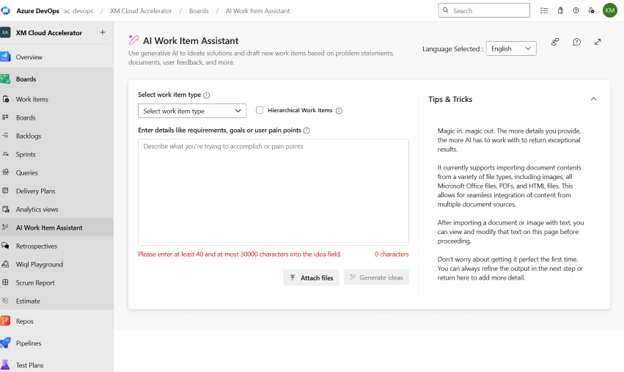
Once a Business Requirements Document has been completed, the next logical step is converting those requirements into user stories and backlog items.
Azure Boards includes AI-assisted capabilities that can generate an initial set of user stories directly from the completed BRD. Rather than creating backlog items one at a time, teams receive a comprehensive first draft that can then be reviewed, refined and prioritized.
Conclusion
Design to BRD to backlog. The same source document moves through the delivery lifecycle without requiring teams to repeatedly re-enter the same information.
Throughout the process, AI handles the repetitive tasks while humans focus on judgement, collaboration, validation and decision-making. That is the real transformation worth paying attention to—not AI replacing the Business Analyst, but AI removing the administrative burden so Business Analysts can spend their time applying the expertise that truly drives successful digital projects.