



Building a new component in Sitecore XM Cloud has always followed the same rhythm: create a data template, serialize it, build the Next.js component, wire up the rendering, maybe add variants, then spin up a test page just to see it actually work. Every step is well understood, and every step eats time that could go toward the parts of the job that actually need a human: design judgment, content strategy, UX polish.
Sitecore AI Skills changes that rhythm. It's a set of Claude Skills that automates the entire XM Cloud component lifecycle from the first data template to a live, testable URL while still pausing at the right moments for you to review and approve.
1. What We've Implemented — A Quick Overview
At its core, this is a guided, end-to-end pipeline built on five purpose-built Claude Skills:
| Skill | Purpose |
|---|---|
| sitecore-component-pipeline-guided | Runs the complete guided workflow. |
| sitecore-template-generator | Creates Sitecore Data Templates. |
| sitecore-nextjs-component-generator | Creates the Next.js component and Sitecore Rendering. |
| sitecore-rendering-variants | Creates Rendering Variants. |
| sitecore-page-component-builder | Creates a Sitecore page and adds the generated component using Sitecore MCP. |
Instead of manually touching templates, serialization YAML, component code, and Sitecore items one at a time, you describe the component you want in plain language, and the pipeline takes it from there generating GUIDs, YAML, React code, and rendering configuration automatically, and pausing before each major phase so nothing ships without your sign-off.
2. What We Can Achieve
The immediate, obvious win is speed — but the deeper value shows up in consistency and quality control:
- No duplicate fields. Before creating anything, the template generator checks whether a field already exists elsewhere and recommends inheritance instead of duplication.
- Serialization that's always in sync. Every phase ends with an automatic Sitecore Serialization Push, so local items and XM Cloud never drift apart.
- Design fidelity, out of the box. Feed it a Figma design and the component generator produces a much closer first pass than a generic scaffold — it still works without one, falling back to a clean baseline HTML implementation.
- Instant, verifiable proof of work. Phase 4 creates a page, attaches a datasource, and hands you a working URL — so you're reviewing a rendered component, not just a diff.
- Documentation for free. Every component gets a generated README, so the next developer isn't reverse-engineering field mappings six months from now.
Put together, teams get a repeatable path from "we need a Promo Banner" to "here's the live test page" without losing the guardrails that keep a growing XM Cloud instance clean.
3. How to Start With This
Before running anything, make sure your environment has the basics in place:
| Development Environment | Required Configuration |
|---|---|
| Sitecore XM Cloud | Sitecore CLI authenticated |
| Sitecore CLI + Serialization CLI | Serialization configured |
| Node.js | Connected XM Cloud environment |
| Next.js solution | Working Next.js application |
| Git | Claude Desktop / Claude Code with Skills enabled |
Once that's in place, starting is a single line:
Run sitecore-component-pipeline-guided
The very first question the pipeline asks is whether you're starting a brand-new component or resuming an interrupted build so you can safely walk away mid-pipeline and pick up exactly where you left off later.
4. Best to Utilize the Skills
You don't have to run the full pipeline every time. The skills are modular, so you can drop into just the phase you need:
- Only need a template? → Run sitecore-template-generator
- Component already has a template, just need the React/Next side? → Run sitecore-nextjs-component-generator
- Need an alternate layout for an existing component? → Run sitecore-rendering-variants
- Just want a page to test something on? → Run sitecore-page-component-builder
A few habits that make results noticeably better
- Be specific up front. A prompt like "Create a Promo Banner with Title, Description, Image, CTA Link, and CTA Text, using a datasource, with a Figma design attached" lets the pipeline skip several clarifying questions.
- Reuse fields, don't recreate them. When the template generator flags an existing field, take the inheritance suggestion it keeps your content model lean.
- Bring a Figma design when you have one. It's optional, but it's the single biggest lever for getting a first draft that needs minimal cleanup.
- Use variants sparingly. Only invoke sitecore-rendering-variants when editors genuinely need multiple layouts.
- Read the generated README. It's the fastest way to understand field mappings without opening the component code.
5. Flow of the Skills
The pipeline is linear with one optional branch, and it pauses for your input before each phase:
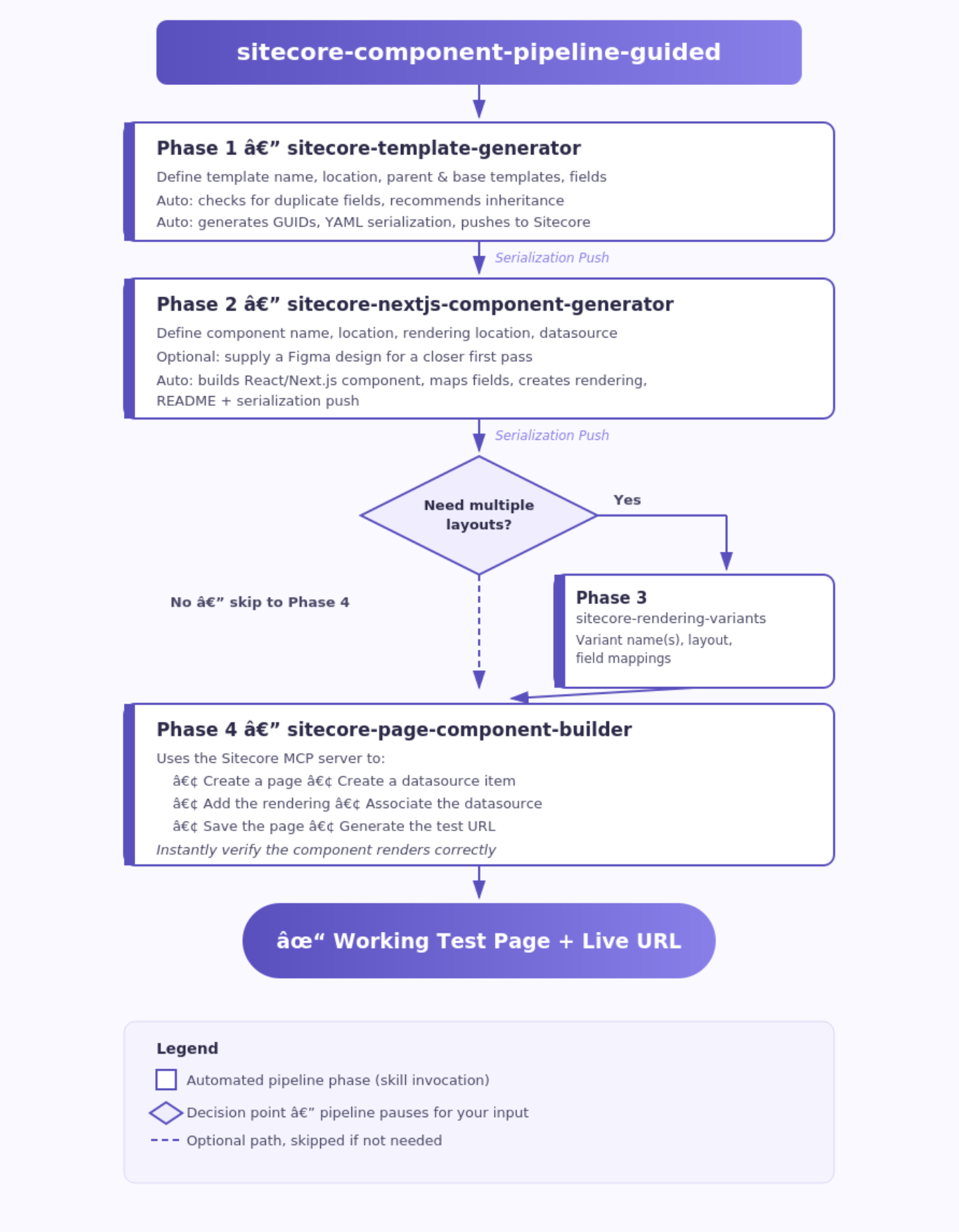
Figure 1 — The guided pipeline, phase by phase
And here's how the five skills relate to each other as a system, rather than just a sequence:
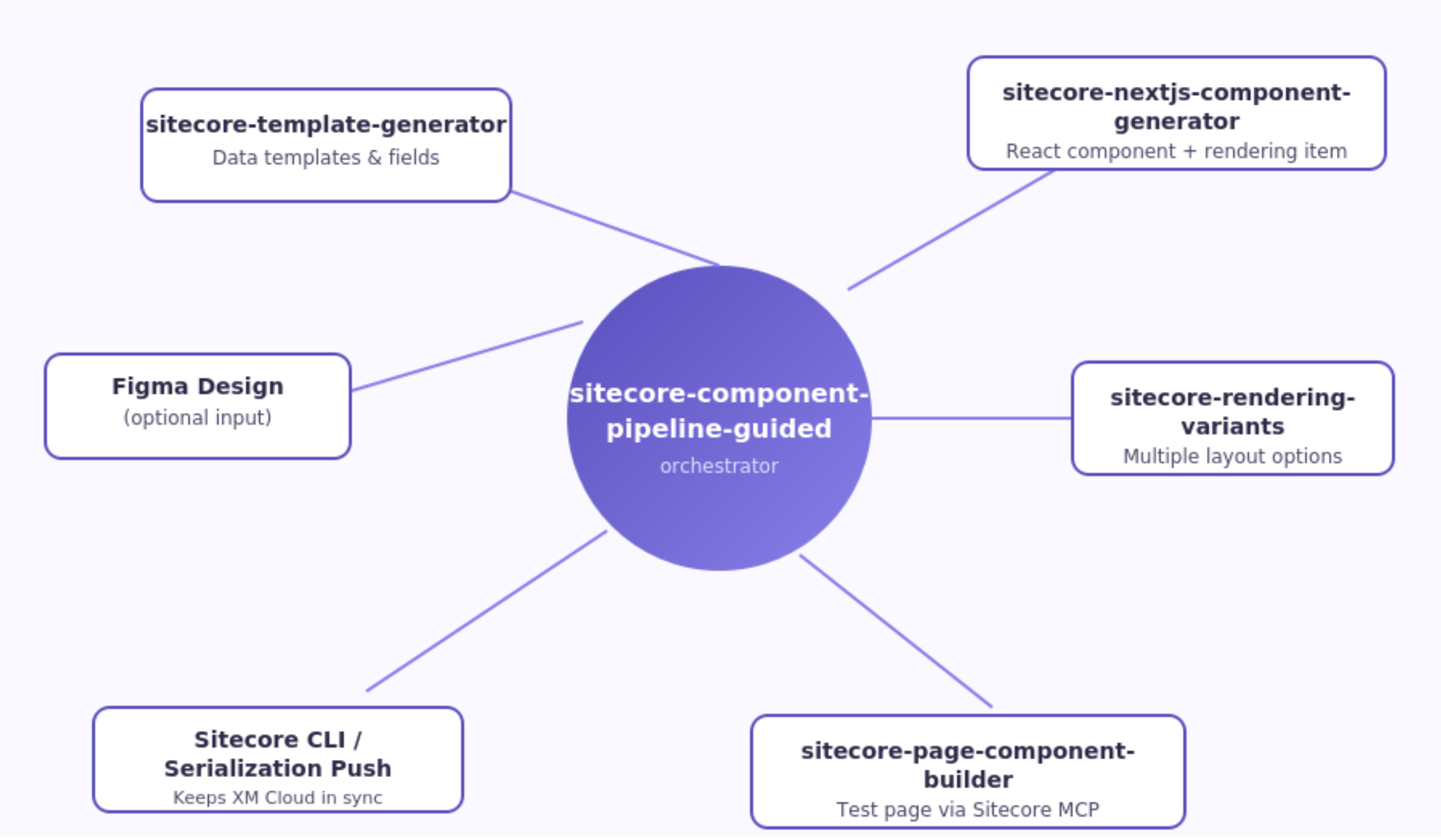
Figure 2 — The Sitecore AI Skills ecosystem
In short: template → component → (optional) variants → test page, with a serialization push after every phase that touches Sitecore items.
6. Best Practices for Sitecore Teams Adopting This
If you're rolling this into a real team workflow, a few practices go a long way:
- Standardize naming before you scale. Keep component names and template names consistent — it makes resuming builds and reading serialization diffs much easier later.
- Treat the guided pipeline as your default entry point. Even for a component you think you understand well, the guided flow's duplicate-field checks catch things ad-hoc development tends to miss.
- Resume, don't restart. If a build gets interrupted, use the resume flow instead of starting over — it preserves the decisions you already made.
- Bring in the Sitecore MCP server for page building. Since Phase 4 relies on it to create pages and datasources directly, having it connected turns "code is done" into "component is live and testable" in the same session.
- Use variants as a deliberate content-authoring decision, not a default — they add real value for editors, but only when there's a genuine need for multiple layouts.
- Keep the README habit alive. Even outside the pipeline, treat the auto-generated README as the source of truth for a component's data contract.
The Bigger Picture
This isn't just a scaffolding shortcut it's a genuinely guided pipeline that mirrors how a careful Sitecore developer already works: check for existing fields, keep serialization in sync, verify the rendered result before calling it done. The difference is that it now happens in minutes, with a consistent process every time, and a live URL waiting at the end to prove it.
For teams building out a growing library of XM Cloud components, that combination — speed and consistency is what actually compounds over time.