



Every growing website eventually faces the same challenge: deciding which content to keep, which to improve, and which to retire. Yet traditional content audits are slow and labor-intensive, requiring teams to spend weeks digging through spreadsheets, cross-referencing analytics, reviewing pages one by one, and evaluating each against brand standards.
XCentium built the Content Optimization Advisor, a custom AI agent powered by Sitecore Agentic Studio, to change that. It transforms a time-consuming, site-wide content audit into an intelligent, on-demand process, giving marketing teams clear, actionable recommendations.
Introduction
The Content Optimization Advisor lives inside Sitecore Agentic Studio, callable from the SitecoreAI Chat interface. You give it two things.
- Website sitemap URL
- Google Analytics 4 property ID
That is it, and it returns a prioritized report telling you what to keep, what to improve, and what to delete, with a reason for every recommendation grounded in your brand.
See It in Action
.gif)
The full run shows selecting the agent, providing a sitemap and GA4 property, and receiving a prioritized audit report.
The Four Inputs Behind Every Recommendation
For every page it evaluates, the agent looks at four things:
- Content: What is actually on the page, including its title, headings, and body.
- Brand Kit: Your brand’s tone, mission, and messaging, pulled directly from your Sitecore Brand Kit.
- Traffic: Live visits and engagement, sourced from Google Analytics 4.
- Freshness: How long it has been since the page was last updated.
Together, these signals let the agent make a defensible call for each page to Keep as-is, Improve, or Delete with a High, Medium, or Low priority. The output is a clean, structured report. Every row has a page, a recommendation, a priority, a brand-alignment note, and an easy-to-understand reason.
How We Built It
Behind the scenes, the agent runs as a workflow agent in Sitecore Agentic Studio, a defined pipeline where schemas govern the structure and your brand grounds the reasoning. Building it requires a mix of Sitecore Agentic Studio’s low-code capabilities and a supporting Azure Function that handles the data-heavy work.
The Architecture
We split the system into two collaborating pieces:
- The workflow agent, built in Sitecore Agentic Studio, orchestrates the run and parses user input, calls out to the data function, applies the AI judgment against your brand, and renders the final report using a Sitecore HTML template.
- A supporting Azure Function handles the data-gathering work for reading the site’s sitemap, authenticating to Google Analytics 4 via a service account, pulling live traffic metrics, fetching and parsing each top-trafficked page, and merging everything into a single JSON payload the agent can consume.
That separation is what makes the whole system durable.
A Single Run, Step by Step
Here is how a request flows through the pipeline:
- The user makes the request. From SitecoreAI Chat, they select the Content Optimization Advisor and enter the sitemap URL and GA4 property ID as a natural-language prompt, and the agent parses the inputs.
- The supporting function gathers the raw materials. The Azure Function fetches and parses the sitemap XML, calls the GA4 Data API for recent traffic activity, and joins the resulting metrics against the page list. It then ranks pages by views, keeps only the top-trafficked ones, fetches each of those pages, extracts the raw HTML, calculates how many days it has been since the page was last updated, and merges everything into a single JSON payload.
- The agent applies its judgment. The AI reads the merged data, uses the audit schema to constrain the shape of what it can return, and grounds its brand-alignment judgment in your Sitecore Brand Kit, which gets retrieved live via Sitecore’s Brand Kit and Context Retrieval tools. Every field in the schema, including the recommended action, priority, alignment notes, and reason, carries a description that tells the AI what to consider when filling it in. The AI weighs the four signals together, content versus brand, traffic, engagement, and freshness, and produces a defensible, consistent verdict for each page.
- The report is rendered. An HTML template pulls the schema-constrained output into a formatted, presentation-ready table that appears directly in chat. Each row lays out the page, the recommendation, the priority, the brand-alignment note, and the reason in the same shape every time, ready to hand to a stakeholder.
Each step corresponds to a specific action in Sitecore Agentic Studio’s low-code workflow canvas: Manual Trigger, Get Request Schema, Generate Request JSON, HTTP Request, Get Structured Schema, and Generate Content.
Sitecore Agentic Studio workflow canvas with six connected steps.
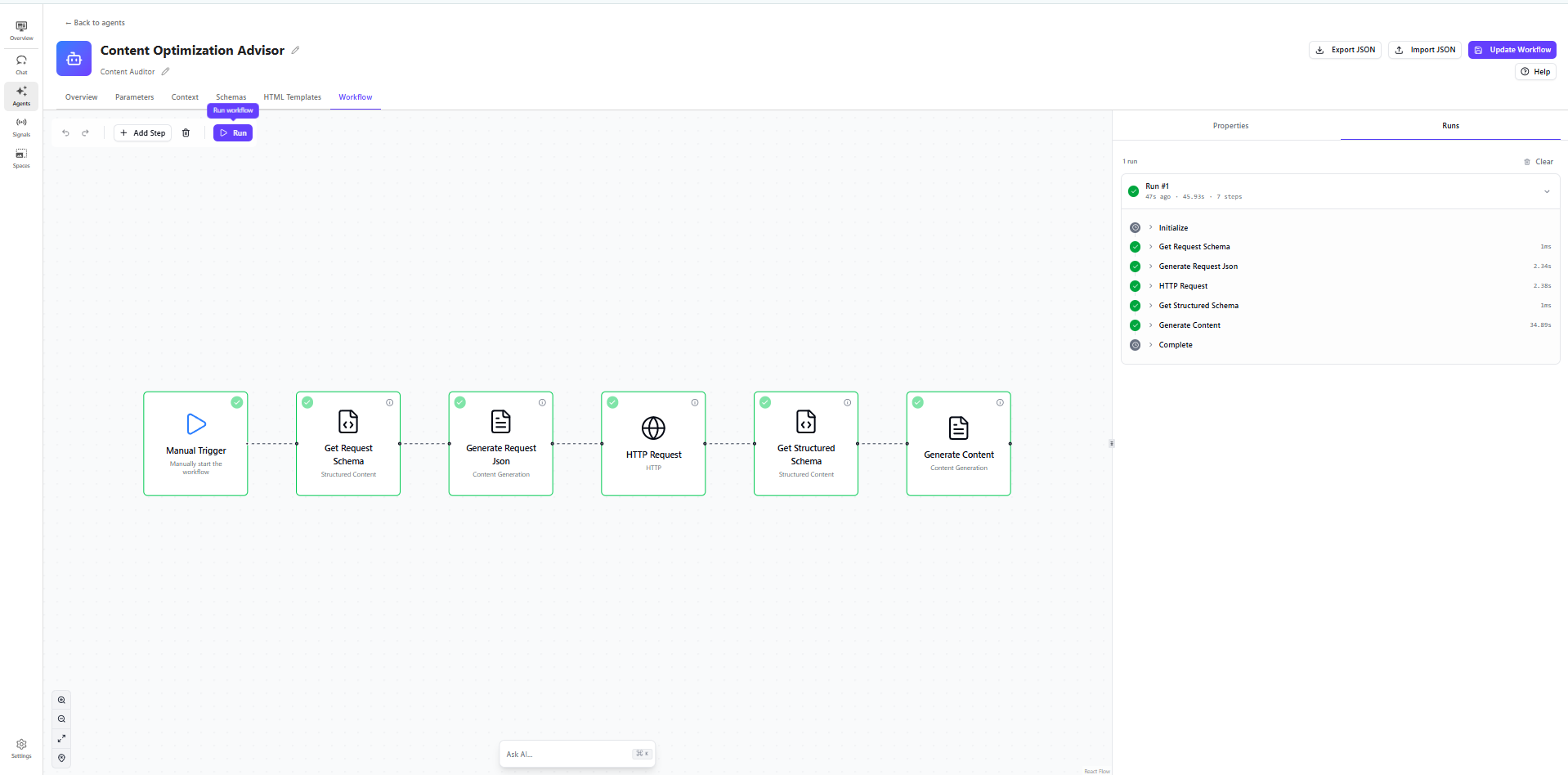
Together, they create an intelligent, repeatable workflow: schemas ensure consistency, your brand informs every recommendation, and the entire process flows from prompt to report without manual intervention.
Making It Work Across Sites
One of our design goals from the start was portability. Because the same service account can be granted Viewer access to as many GA4 properties as needed, onboarding a new site is essentially free. Enter the new sitemap URL and property ID and grant the service account permission on that property. The Sitecore Agentic Studio agent handles every site.
Key Takeaways
The solution is built around a clear architectural separation of responsibilities. The Azure Function is responsible for collecting data, while the AI agent focuses on analyzing it and making recommendations. Structured schemas ensure every execution produces consistent, predictable output, and Brand Kit together with Context Retrieval provides brand guidance dynamically at runtime rather than embedding it in prompts. Credentials are securely managed through application settings instead of hardcoded in the implementation, and the overall design is portable, enabling the same function and exportable agent to be reused across multiple websites with minimal effort.