



For marketers, measuring WCAG compliance provides actionable insights into content effectiveness. Issues like poor contrast, missing alt text, unclear link labels, or inaccessible forms can prevent users from engaging with campaigns or completing conversions. By identifying and addressing these gaps, marketers can ensure their content performs optimally across all audiences, including those using assistive technologies.
Additionally, accessibility improvements align closely with SEO best practices—such as structured content, proper headings, and descriptive metadata—helping improve search rankings and organic traffic. WCAG compliance also reduces legal and reputational risks while strengthening brand perception as inclusive and customer centric.
Why we need WCAG compliance and measurement
Web Content Accessibility Guidelines (WCAG) are internationally recognized standards that ensure websites are accessible to all users, including people with disabilities. Following WCAG not only improves usability and inclusivity but also directly supports marketing goals such as increasing reach, engagement, and conversions. Accessible websites are easier to navigate, read, and interact with—leading to better user experiences, lower bounce rates, and higher customer satisfaction.
How AI Agents are helping Digital Teams with WCAG
Incorporating WCAG analysis into regular marketing workflows enables teams to continuously optimize digital experiences, ensuring campaigns are not only creative but also accessible, measurable, and effective for every user.
How WCAG was handled earlier vs. AI Agents today
Traditionally, WCAG compliance was managed through a combination of manual audits, developer-led fixes, and periodic scans using accessibility tools. These approaches were often time-consuming, required specialized expertise, and were typically performed as one-time or infrequent checks—making it difficult for marketing teams to continuously monitor and improve accessibility as content evolved.
With the introduction of AI Agents—such as those built using Sitecore’s Agentic framework—WCAG analysis becomes continuous, scalable, and far more actionable. Instead of static reports, AI agents can automatically evaluate pages, interpret accessibility issues in context, and generate human-readable insights that marketers can directly act upon. This shifts accessibility from a reactive, compliance-driven task to a proactive optimization strategy embedded within everyday workflows.
Benefits of AI Agents vs Traditional Methods
- Continuous Monitoring vs Periodic Audits
AI agents can evaluate accessibility in real time or on-demand, ensuring that new campaigns and content remain compliant without waiting for scheduled audits. - Actionable Insights for Marketers
Instead of technical error logs, AI agents translate WCAG issues into clear, content-focused recommendations (e.g., improving CTA clarity, fixing alt text, enhancing readability). - Faster Time to Resolution
Issues are identified and explained instantly, reducing dependency on specialized accessibility experts or long feedback cycles. - Scalability Across Pages and Campaigns
AI agents can analyse multiple pages or entire sites quickly, making it easier to maintain accessibility across large digital ecosystems. - Improved Collaboration Between Teams
Marketers, designers, and developers can work from the same AI-generated insights, improving alignment and execution. - Better Alignment with Business Metrics
Accessibility improvements driven by AI directly support marketing KPIs like engagement, conversion rates, SEO performance, and audience reach.
How is this implemented using Agent Studio
We will use Sitecore AI Agentic Studio to build an Agent that will accept an input of type URL for a page and measure the WCAG compliance and score it using the standard available skills directory.
- From within the Sitecore AI Agentic Studio, create a new Agent.
- In the Overview tab, provide a meaningful name and description for it.
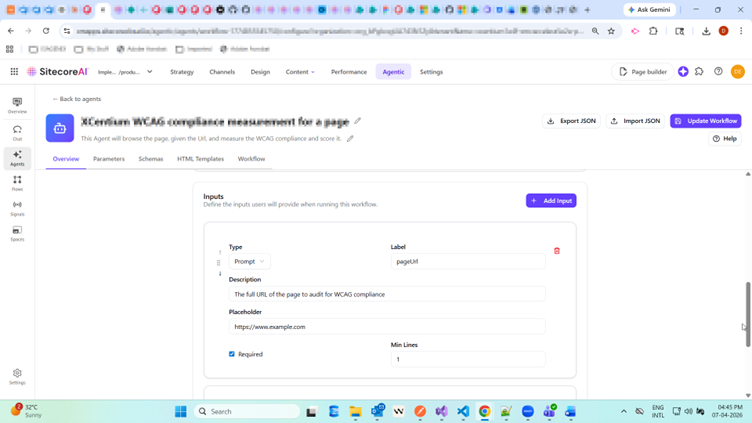
- Add an input of type “Prompt” accepting the input URL for the page.
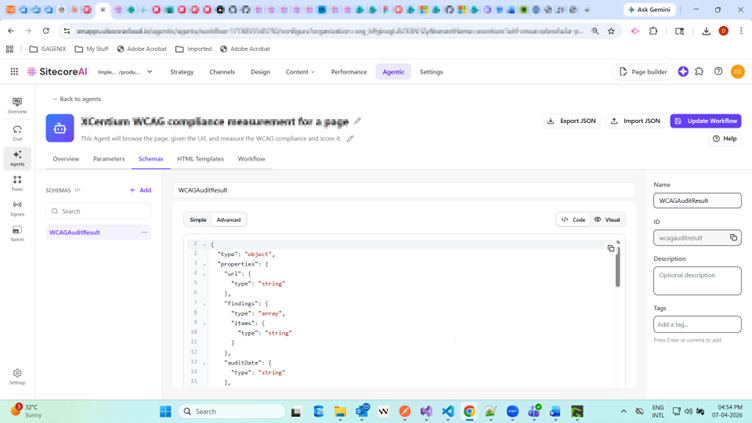
Add a Schema in the Schemas tab for the analysis and report generation. Based on the standard available skills directory, the Schema can be the following:
{
"type": "object",
"properties": {
"url": {"type": "string"},
"findings": {"type": "array","items": {"type": "string"}},
"auditDate": {"type": "string"},
"minorIssues": {"type": "number"},
"totalIssues": {"type": "number"},
"wcagVersion": {"type": "string"},
"levelAStatus": {"type": "string"},
"overallScore": {"type": "number"},
"levelAAStatus": {"type": "string"},
"seriousIssues": {"type": "number"},
"criticalIssues": {"type": "number"},
"moderateIssues": {"type": "number"},
"conformanceLevel": {"type": "string"},
"scoreClassification": {"type": "string"},
"interfaceDescription": {"type": "string"}
},
"required": [
"url",
"findings",
"auditDate",
"minorIssues",
"totalIssues",
"wcagVersion",
"levelAStatus",
"overallScore",
"levelAAStatus",
"seriousIssues",
"criticalIssues",
"moderateIssues",
"conformanceLevel",
"scoreClassification",
"interfaceDescription"
],
"additionalProperties": false
}
5. Go to Workflow tab and create a workflow of steps as below.
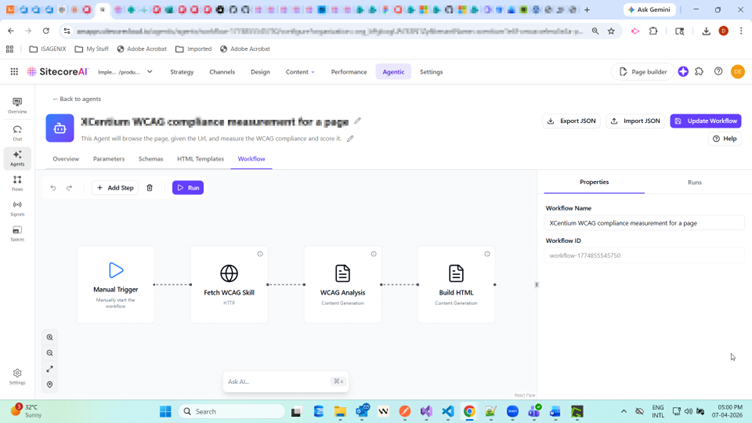
- Fetch WCAG Skill: Feed skills to the agent using the standard skills directory and store them in a variable.
- WCAG Analysis: Any additional parameters required by the Agent are fetched here, and the WCAG compliance of the page is analyzed using the LLM in the system prompt.
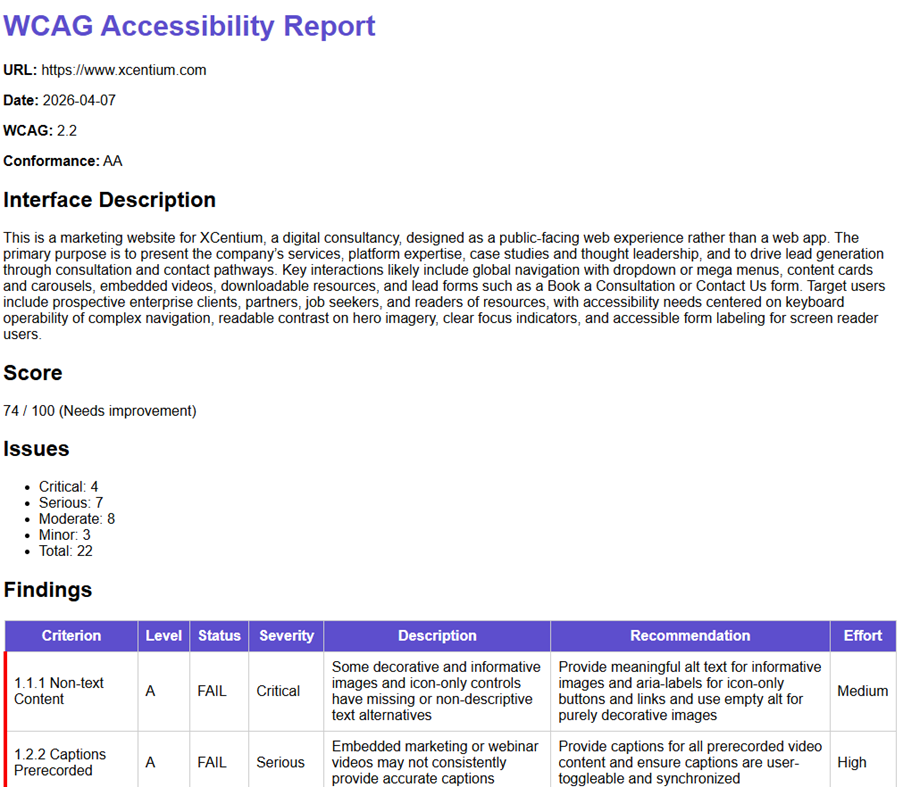
- Build HTML: This step reads the JSON output from the WCAG analysis report and formats it into a downloadable HTML report.
6. Once ready, test the workflow steps by clicking on “Run” from the workflow tab. After verification, trigger the Agent run using Spaces in Agentic Studio. You should be able to download a well-formatted HTML report.
Reference: