



Sooner or later, an integration built in Sitecore Connect needs to send an email that doesn't come from a generic platform address. It might be a form confirmation from a team mailbox, an alert from a branded sender, or a notification that has to look like it came from the client. The built-in email actions don't give you much control over who the message appears to come from, so you end up needing your own SMTP connection.
We recently set one up for a client using the Email (Custom) private app in Sitecore Connect. The app worked out of the box for a standard authenticated mail server. Our client's mail relay wasn't standard, so we edited the app's source code directly inside Sitecore Connect. This post covers how that works and the problems that only appeared once we tried to connect.
The Problem: The Requirements and the Connector Didn't Line Up
Our client needed Sitecore Connect recipes to send email through their existing SMTP relay, using custom From addresses such as a shared team mailbox. That relay is the same one their Sitecore XP site already uses. It accepts mail on port 25 and trusts the sending server by IP address, so no credentials are involved.
The Email (Custom) private app fits most SMTP providers. It asks for a username, password, SMTP server, port, and STARTTLS setting, then authenticates every connection. Measured against our requirements, that left two gaps:
- Authentication. Username and password are required fields, and the connector always attempts AUTH LOGIN. An IP-trusted relay has no use for either. Pointed at port 25, the connection succeeded and then failed at authentication.
- Recipient inputs. To, CC, and BCC are arrays of objects, which are awkward to map in a recipe and overkill in this case. A single semicolon-delimited string is simpler to build and read.
Neither gap called for a new service or a change to the client's mail infrastructure. Both were related to behavior inside the connector, and Sitecore Connect lets us edit the connector's source directly.
The Solution: Edit the App, Don't Work Around It
Reaching the Source
Email (Custom) is a private app built on the Connector SDK, which Sitecore Connect exposes directly. Open it from the Connector SDK area and you get a Source code tab with the full Ruby definition, a Test code panel for running the connection and actions, a Versions tab, and a Release latest version button. Nothing is hidden. The connection fields, the SMTP and IMAP logic, and the action inputs are all plain code you can read and change.
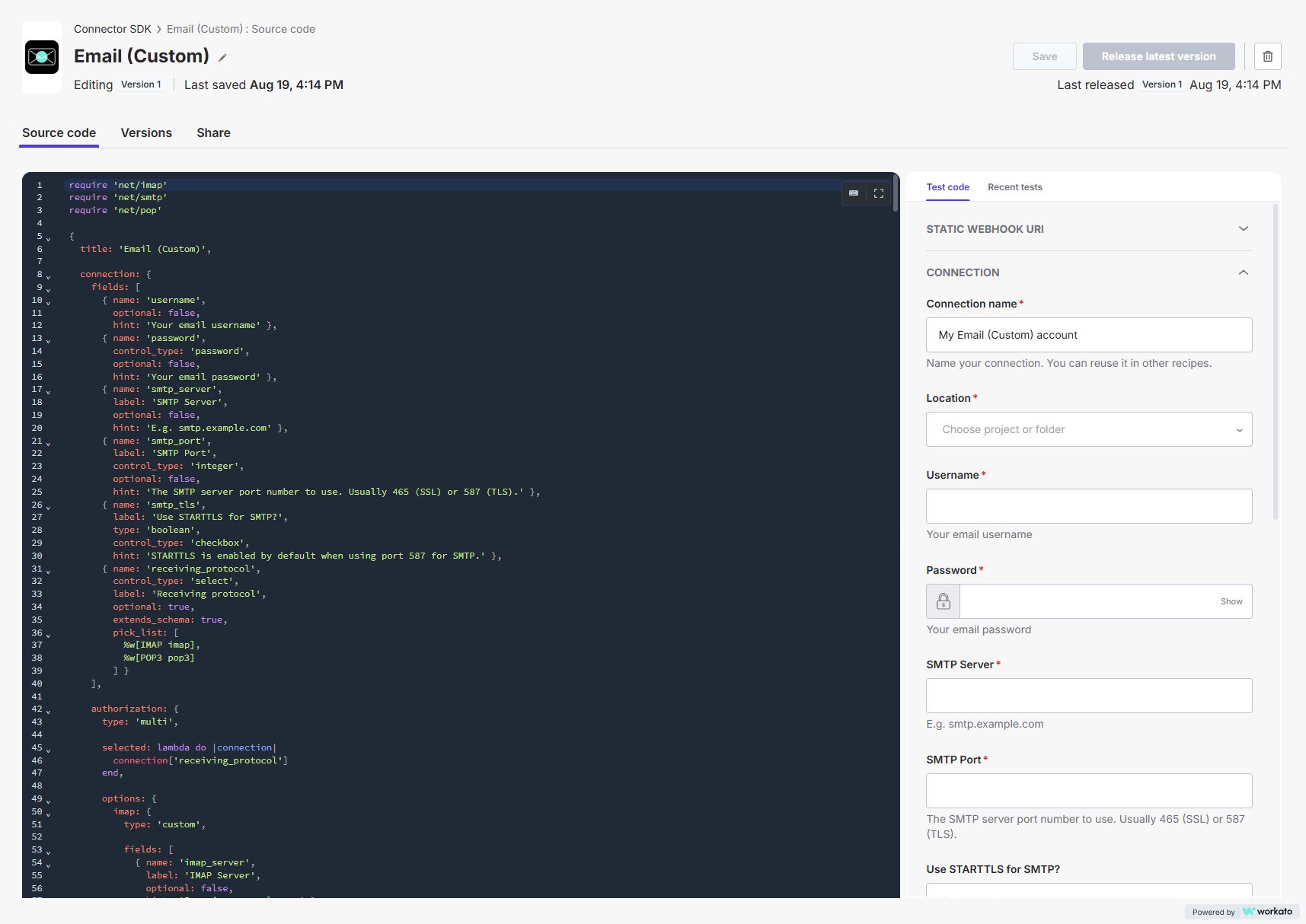
That changes the question from "what does the connector allow?" to "what should the connector do?"
Change 1: Make Authentication Optional
Two small edits close the authentication gap. First, the username and password fields become optional:
{ name: 'username',
  optional: true,
  hint: 'Leave blank for an IP-trusted relay with no authentication.' },
{ name: 'password',
  control_type: 'password',
  optional: true,
  hint: 'Leave blank for an IP-trusted relay with no authentication.' },
Second, smtp_connect only attempts AUTH LOGIN when credentials exist:
smtp_connect: lambda do |connection|
  smtp_tls = connection['smtp_port'].to_i == 587 || connection['smtp_tls']
  smtp = Net::SMTP.new(connection['smtp_server'], connection['smtp_port'])
  smtp.enable_starttls if smtp_tls
  if connection['username'].present? && connection['password'].present?
    smtp.start(connection['smtp_server'] || 'localhost',
               connection['username'], connection['password'], :login)
  else
    smtp.start(connection['smtp_server'] || 'localhost')
  end
  { 'smtp' => smtp }
end,
The test connection and both send actions call smtp_connect without caring how it authenticated, so nothing else had to change. Connections that do supply credentials behave exactly as before.
Change 2: Semicolon-Delimited Recipients
While we were in the code, we closed the second gap. The To, CC, and BCC inputs become plain strings, and a small helper splits them:
parse_email_list: lambda do |value|
  return [] if value.blank?
  value.split(';').map(&:strip).reject(&:blank?)
end,
get_all_recipients and construct_email_headers call the helper in place of the array handling. The attachment action reuses the same input definition, so it picked up the change automatically.
Running It
Our process:
- Open Email (Custom) in the Connector SDK and review the source.
- Make the change in the editor and save.
- Use the Test code panel to run the connection test against the relay.
- Send a test message through the Send email action and confirm delivery.
- Release the new version once the test passes.
- Update the connection and any recipes to use the new version.
Testing before releasing mattered. The Test code panel gave us the same error messages the recipe would see, so each failure could be traced to a single change.
What a Passing Code Change Did Not Tell Us
The code edit was the easy part. These are the things that only surfaced once real traffic was involved:
- Allowlist the right source IPs. An IP-trusted relay only helps if it trusts the sender. Workato publishes outbound IPs per data center, so your admin needs the ones for your region on the relay's trusted list. Sitecore Connect's own URL doesn't reveal the data center because it's white-labeled. Our dashboard handoff landed on the unprefixed app.workato.com host, which maps to the US data center. You can also confirm the source IP empirically by pointing a recipe step at an endpoint you control and checking its logs.
- Remember the trust model changed. A relay that trusts by IP can't tell which application is sending, so any From address may be accepted once the IP is allowed. Get your security team to sign off rather than assuming the relay's authenticated-path controls still apply.
- Treat input changes as breaking. Switching To, CC, and BCC from arrays to strings means existing recipes must be remapped after you move to the new version. If you have recipes in production, add the new fields alongside the old ones and migrate deliberately.
The Impact: One App, Our Rules
The change was small, but it closed two gaps between the client's requirements and the stock connector. The connector now works with both models: credentials for a standard provider, no credentials for an IP-trusted relay. Sending from a custom address became a matter of what we put in the From field, and the semicolon-delimited recipients made recipes easier to build and read.
The private app approach also keeps the fix where it belongs. Nothing is bolted on outside Sitecore Connect, there's no extra service to host, and the next recipe that needs the same connection reuses it.
Conclusion
A private app in Sitecore Connect isn't a black box. When Email (Custom) didn't match how a client's mail infrastructure worked, we changed the app instead of redesigning around it. Read the source, test in the SDK panel, release a new version, and keep the network and security details, such as source IPs, ports, and trust, on your checklist, because the code change won't cover them.
Do that, and the connector fits your environment instead of the other way around. You also finish with a documented, versioned change that the next developer can read and extend.
Need to send email from Sitecore Connect with a custom address, or have an integration that doesn't fit the standard connectors? Get in touch.