



What Canoe Does
Contentstack Canoe, an AI visibility tool, makes it easy to set up a monitor around a specific product and buyer persona. This is a useful way to see how one offering reads to one buyer segment when AI tools are asked about it.
It's just as easy to point that same flexibility at a simpler, broader question first: does AI mention the brand at all when someone asks a general question about the category it competes in?
That one simple question makes a strong starting baseline. It's easy for non-technical stakeholders like leadership and marketing to review, and it complements the more targeted, product-level monitors you'll likely build alongside it.
Here's how to set one up in a few quick steps:
Step 1: Reviewing the Auto-Detected Products
When you set up a monitor, Canoe scans the brand's website and pulls out the products it finds on its own, saving you from listing them by hand. For a services brand, that might turn up around ten, from platform-level tools to more specific strategy agents.
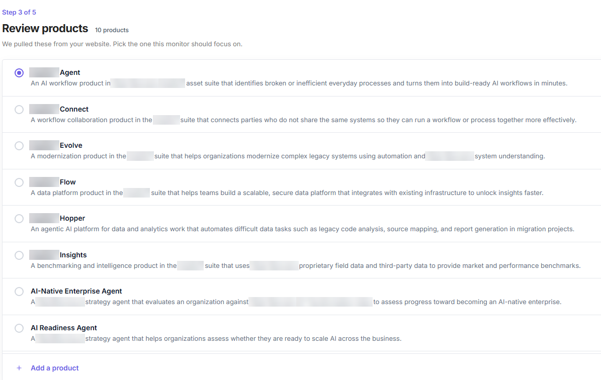
Everything on that list is a specific product, which is fine if you're tracking one offering. But if you want something that speaks for the brand, Canoe handles that too. You can add your own entry alongside the auto-detected ones, which is what we'll cover next.
Step 2: Adding a Custom, Brand-Level Product
Canoe includes an "Add a product" action alongside the auto-detected list, opening a simple two-field form: Name and Description. It's a quick way to define an entry that represents the brand rather than any single offering. Since the top-level brand column in Canoe already shows the brand's own name, it's worth choosing a distinct label for the product itself so the two read clearly apart on the dashboard. A reasonable choice:
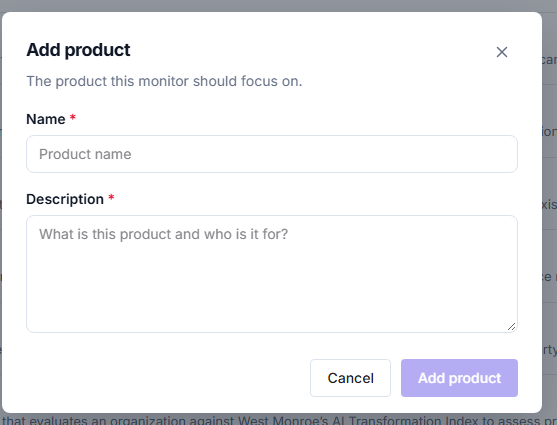
Name: Brand Visibility
Description: [Brand] is a management and technology consulting firm helping organizations with digital transformation, data, AI, and operational strategy. This monitor isn't about any one product or agent. It's tracking something broader: whether AI tools mention and recommend the brand at all when someone asks about top management or technology consulting firms.
We named it "Brand Visibility" instead of just reusing the brand's own name, mainly so it stands out on the dashboard. Sitting next to entries like a benchmarking product or a readiness agent, it's immediately clear this one isn't another product line. It's the catch-all.
Step 3: Reviewing and Customizing the Suggested Personas
With the product defined, Canoe suggests several personas based on the site content, each representing a different buyer segment asking questions in its own voice. Think mid-market banking leaders, utility IT executives, healthcare IT teams, private equity deal teams, software revenue operations leaders, and manufacturing operations teams.
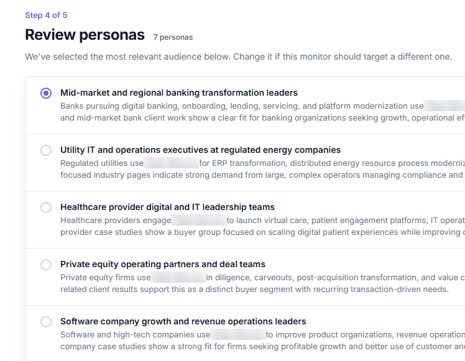
Each is intentionally narrow, which is useful when a monitor should closely represent one segment. For a brand-level monitor, though, you can just as easily swap in your own persona via "None of these? Add your own persona," keeping the buyer profile as broad as the product it's paired with.
Step 4: Building the Custom Persona
The custom persona form is more structured, with fields grouped under Identity, Demographics, and Profile:
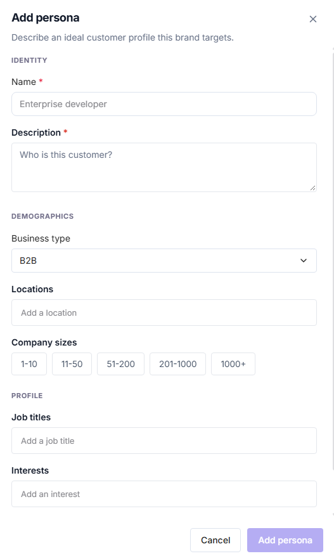
The interests field is useful for tying a persona to specific topics when that precision helps. For a brand-level persona, leave it blank to keep the buyer profile genuinely general.
Step 5: Reviewing the Generated Prompts
Before the monitor goes live, Canoe shows you the actual prompts it's going to test, real questions a buyer like this might type into ChatGPT or Gemini, grouped by where they are in the buying journey.
- Awareness: "What are the top alternatives to building an internal digital transformation team?"
- Consideration: "Who are the top consulting firms for data and AI strategy?"
- Decision: "How reliable is [Brand] for large-scale transformation programs?"
Most of these don't mention the brand at all. They're checking whether AI brings it up on its own. A few do name the brand directly, which tests how it's perceived once it's already in the conversation. That's a good mix for a brand-level monitor, and on the Growth plan you can edit, add, or remove prompts so they sound more like what your actual customers would ask.
What This Gives Us
Once live, this monitor gives you a single, easy-to-read baseline for "does AI mention the brand at all," and it doesn't depend on any one product or vertical. A leader or marketing lead can glance at the Brand Visibility results without needing to know what any specific product or agent does or which industry it targets.
The bigger takeaway is how flexible Contentstack Canoe is throughout this process. The auto-detected products and personas make it quick to build detailed, product-specific monitors, and that same setup handles a broader, brand-wide view just as easily, all through the same simple, guided steps.