



```html
Integrating Salesforce data into Microsoft Fabric can be implemented using the Fabric Metadata-Driven (FMD) Framework. The key idea is to keep connection details, source definitions, entity definitions, target Lakehouse information, and load state in metadata, while reusable pipeline logic performs the actual ingestion.
This approach is particularly useful when multiple Salesforce objects, such as Account and Contact, need to be ingested using the same orchestration pattern. Instead of building object-specific ingestion logic for every entity, the framework uses metadata to determine what to load, where to load it, and whether the execution should be a full or incremental load.
Solution Overview
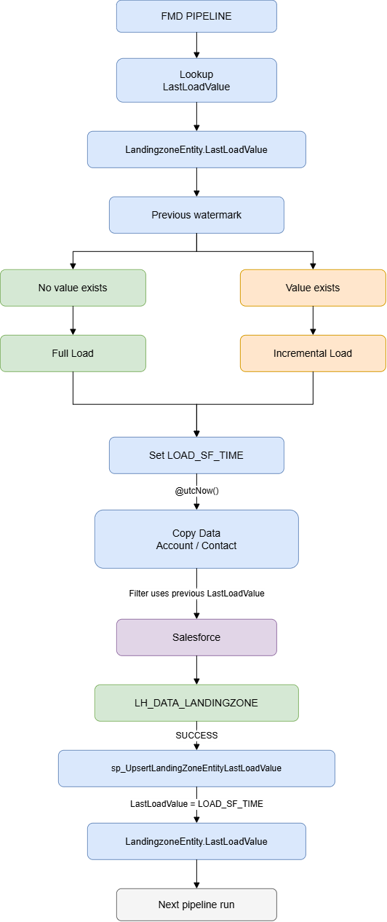
The implementation described in this article follows this high-level flow:
Create the Salesforce Connection in Microsoft Fabric
The first step is to create a cloud connection in Microsoft Fabric. Navigate to Manage connections and gateways and select New connection. Choose Cloud as the connection location and Salesforce as the connection type.
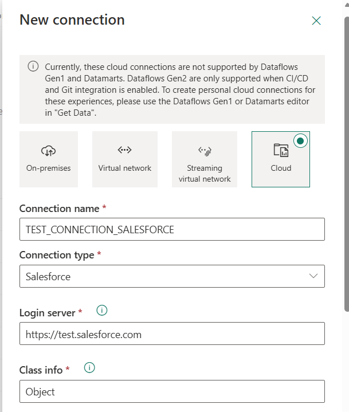
Figure 1. Microsoft Fabric Salesforce cloud connection configuration.
| Setting | Value |
|---|---|
| Connection location | Cloud |
| Connection name | TEST_CONNECTION_SALESFORCE |
| Connection type | Salesforce |
| Login server | https://test.salesforce.com |
| Class info | Object |
| Authentication method | OAuth 2.0 |
The login server points to the Salesforce test/sandbox environment. Authentication is configured through OAuth 2.0. The connection is centrally maintained in Fabric, rather than embedding Salesforce authentication details in each pipeline.
After the connection is created, use Manage Users to grant the users who will execute the FMD pipelines access to the connection.
Register the Connection in FMD
Creating the Fabric connection establishes connectivity, but the FMD Framework also needs metadata that identifies the connection. In this implementation, the FMD Connection table contains the Salesforce connection record.
Figure 2. FMD Connection table entry for the Salesforce connection.
| ConnectionId | ConnectionGuid | Name | Type | GatewayType | DatasourceReference | IsActive |
|---|---|---|---|---|---|---|
| 7 | 3390fdeb-b484-4c31... | TEST_CONNECTION_SALESFORCE | SALESFORCE | NULL | NULL | TRUE |
ConnectionId is important because it links the FMD connection metadata to the logical DataSource configuration described next.
Configure the Salesforce DataSource
The FMD DataSource table provides a logical abstraction for the source system. In this implementation, the Salesforce DataSource references ConnectionId 7.
| DataSourceId | ConnectionId | Name | Namespace | Type | Description | IsActive |
|---|---|---|---|---|---|---|
| 5 | 7 | SALESFORCE_XC | SF | SALESFORCE_TABLE | SALESFORCE_TABLES | True |
Figure 3. FMD DataSource table entry for Salesforce.
This creates the metadata relationship Connection → DataSource. The DataSourceId of 5 is subsequently referenced by the Salesforce Landingzone Entity records.
Configure Salesforce Landing Zone Entities
The next layer of metadata identifies the Salesforce objects that should be ingested. In the current implementation, Account and Contact are configured as active entities, in LandingZoneEntity table.
Figure 4. FMD Landingzone Entity metadata for Salesforce Account and Contact.
| LandingzoneEntityId | DataSourceId | LakehouseId | SourceSchema | SourceName | IsIncremental | IsIncrementalColumn | IsActive |
|---|---|---|---|---|---|---|---|
| 6 | 5 | 1 | Salesforce | contact | True | LastModifiedDate | True |
| 7 | 5 | 1 | Salesforce | account | True | LastModifiedDate | True |
The important settings here are IsIncremental = True and IsIncrementalColumn = LastModifiedDate. Salesforce's LastModifiedDate is therefore used to identify records that have changed since the previously persisted load watermark.
Configure the FMD Lakehouses
The FMD Lakehouse metadata table identifies the Fabric Lakehouses used by the framework. The current configuration defines a landing zone, Bronze layer, and Silver layer.

Figure 5. FMD Lakehouse metadata.
| LakehouseId | Name | IsActive |
|---|---|---|
| 1 | LH_DATA_LANDINGZONE | True |
| 2 | LH_BRONZE_LAYER | True |
| 3 | LH_SILVER_LAYER | True |
The Salesforce Landingzone Entity records use LakehouseId = 1, which resolves to LH_DATA_LANDINGZONE. The landing zone is therefore the initial target for the Salesforce Account and Contact ingestion.
Determine Full Load vs. Incremental Load
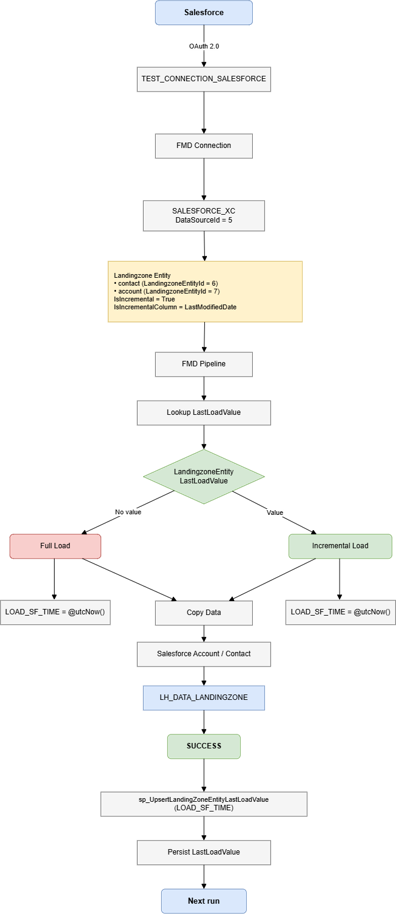
At runtime, the FMD pipeline first executes a Lookup against the LandingzoneEntityLastLoadValue table. The Lookup retrieves the LastLoadValue associated with the entity being processed.
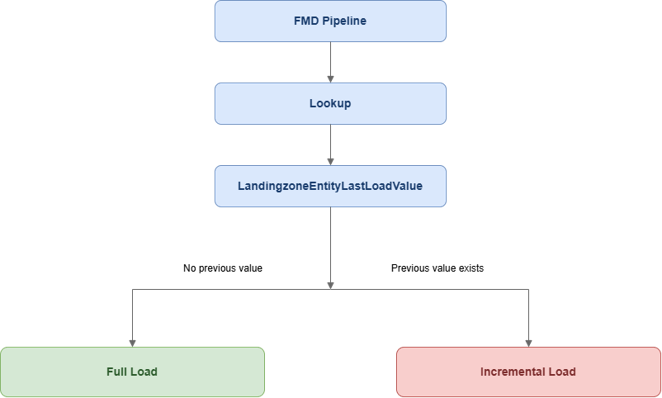
For an entity's first execution, if no previous LastLoadValue exists, the pipeline performs a full load. On subsequent executions, the previous LastLoadValue is used to filter Salesforce records for incremental processing.
Set LOAD_SF_TIME
When the Copy Data job for Account or Contact is initiated, the pipeline sets a variable named LOAD_SF_TIME using the expression:
@utcNow()
This is a pipeline-generated UTC timestamp. It is important to distinguish this value from Salesforce's LastModifiedDate: LastModifiedDate is the Salesforce field used for change detection, while LOAD_SF_TIME is the current pipeline timestamp that becomes the persisted watermark for the next execution.
Copy Salesforce Data to Fabric
The Copy Data activity copies the configured Salesforce object, Account or Contact, into the Fabric landing zone. For an incremental execution, the LastLoadValue retrieved by the Lookup is passed to the Copy Data activity as the filter parameter.
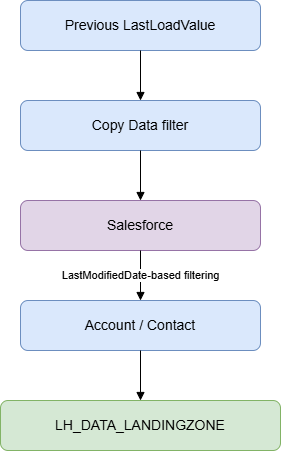
The pipeline therefore does not require a hard-coded timestamp in the Salesforce query/filter. The value is obtained dynamically from the FMD load-state metadata at runtime.
Persist the 'New Load' Watermark
After the Salesforce data is successfully moved to Fabric, the FMD Framework stored procedure sp_UpsertLandingZoneEntityLastLoadValue is invoked.
Stored procedure:
sp_UpsertLandingZoneEntityLastLoadValue
Parameter:
LastLoadValue = LOAD_SF_TIME
The value captured in LOAD_SF_TIME is supplied as the LastLoadValue parameter. The framework therefore persists the timestamp captured at the start of the copy operation for use by the next execution.
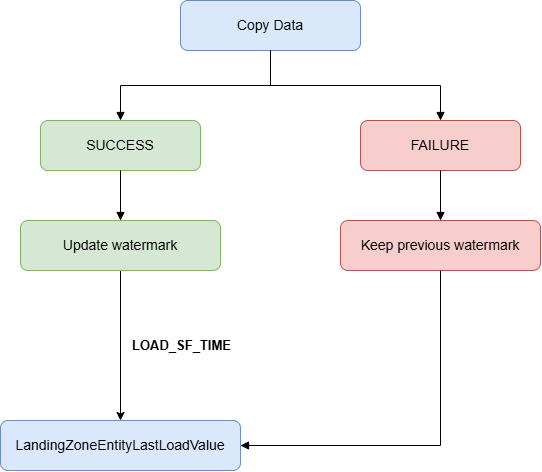
Why the Watermark Is Updated After a Successful Load
The watermark update is placed after successful data movement. This prevents a failed Copy Data operation from advancing the persisted load state. If the data movement fails, the successful-load path that invokes the upsert procedure is not completed, allowing the previous watermark to remain available for the next execution.
End-to-End Metadata and Execution Flow
Why This Is Metadata-Driven
The implementation demonstrates the central value of a metadata-driven framework: the reusable pipeline does not need to contain Salesforce-specific orchestration for every object. Connection, DataSource, entity, target Lakehouse, incremental settings, and load-state information are represented through metadata.
| Concern | Where it is represented |
|---|---|
| How to connect to Salesforce | Fabric Cloud Connection + FMD Connection |
| Logical Salesforce source | FMD DataSource |
| Which Salesforce object to load | Landingzone Entity |
| Incremental behavior | IsIncremental / IsIncrementalColumn |
| Target landing location | LakehouseId |
| Previous watermark | LandingzoneEntityLastLoadValue |
| Current execution timestamp | LOAD_SF_TIME = @utcNow() |
| Watermark persistence | sp_UpsertLandingZoneEntityLastLoadValue |
Adding More Salesforce Objects
Once the Salesforce connection and reusable ingestion pattern are established, additional Salesforce objects can be onboarded through the corresponding metadata. For example, Opportunity, Lead, Case, or other Salesforce objects can follow the same pattern, subject to the source-specific requirements and metadata supported by the FMD implementation.
The key principle is that the pipeline orchestration remains reusable while metadata describes the entity being processed.
Best Practices and Considerations
- Use OAuth 2.0 for Salesforce authentication and keep credentials within the managed connection.
- Grant connection access only to the users or execution identities that require it.
- Keep the Fabric connection name and FMD metadata name consistent where practical to simplify troubleshooting.
- Use LastModifiedDate consistently for incremental extraction when it is appropriate for the Salesforce object and load requirements.
- Do not advance the persisted watermark until the corresponding data movement has completed successfully.
- Monitor Salesforce API limits, object volume, pagination, and execution duration for production workloads.
- Consider how deletes, schema changes, historical loads, retries, and reprocessing should be handled for each Salesforce object.
Conclusion
The Salesforce integration demonstrates how the FMD Framework can turn a conventional source-to-Lakehouse integration into a metadata- and state-driven ingestion process. The Fabric Salesforce connection provides authenticated connectivity, FMD metadata maps the connection to a logical DataSource and Salesforce entities, and the pipeline uses LandingzoneEntityLastLoadValue to determine full versus incremental processing.
The use of LOAD_SF_TIME = @utcNow(), followed by sp_UpsertLandingZoneEntityLastLoadValue after successful data movement, closes the incremental-load loop and provides the starting point for the next execution.
The result is a reusable pattern in which onboarding additional Salesforce objects can primarily be driven by metadata rather than by creating an entirely new orchestration implementation for every object.
References:
```