



Content often needs to move long before an entire solution is ready to deploy. A page approved in development may be needed in test. A campaign assembled in staging may need to be promoted to production. Doing that item by item is slow, repetitive, and easy to get wrong.
The Content Migration Assistant turns Sitecore's Content Transfer API into a guided marketplace experience. It lets an authorized user connect two SitecoreAI environments, browse the source content tree, choose exactly what to move, and follow the operation from export through import.
- Select source items from a familiar Sitecore-style tree.
- Choose whether to transfer one item or the item and all descendants.
- Decide how existing destination items should be handled.
- Monitor export, transfer, and import from one screen.
Designed for controlled promotion: The assistant moves content between SitecoreAI environments. It is not a replacement for solution deployment, Sitecore Content Serialization, or a full XM/XP-to-SitecoreAI migration.
A Simpler Way to Configure a Transfer
The workflow begins with the source and destination environment hostnames, short-lived JSON Web Tokens (JWTs), and the target database. The credentials stay on the server side of the application while requests are proxied through /api/transfer. This avoids browser CORS restrictions and prevents direct browser calls to the Sitecore APIs.
The interface is built primarily with Sitecore's Blok component library, so labels, inputs, cards, alerts, progress indicators, selectors, and actions feel consistent with the wider Sitecore product experience.
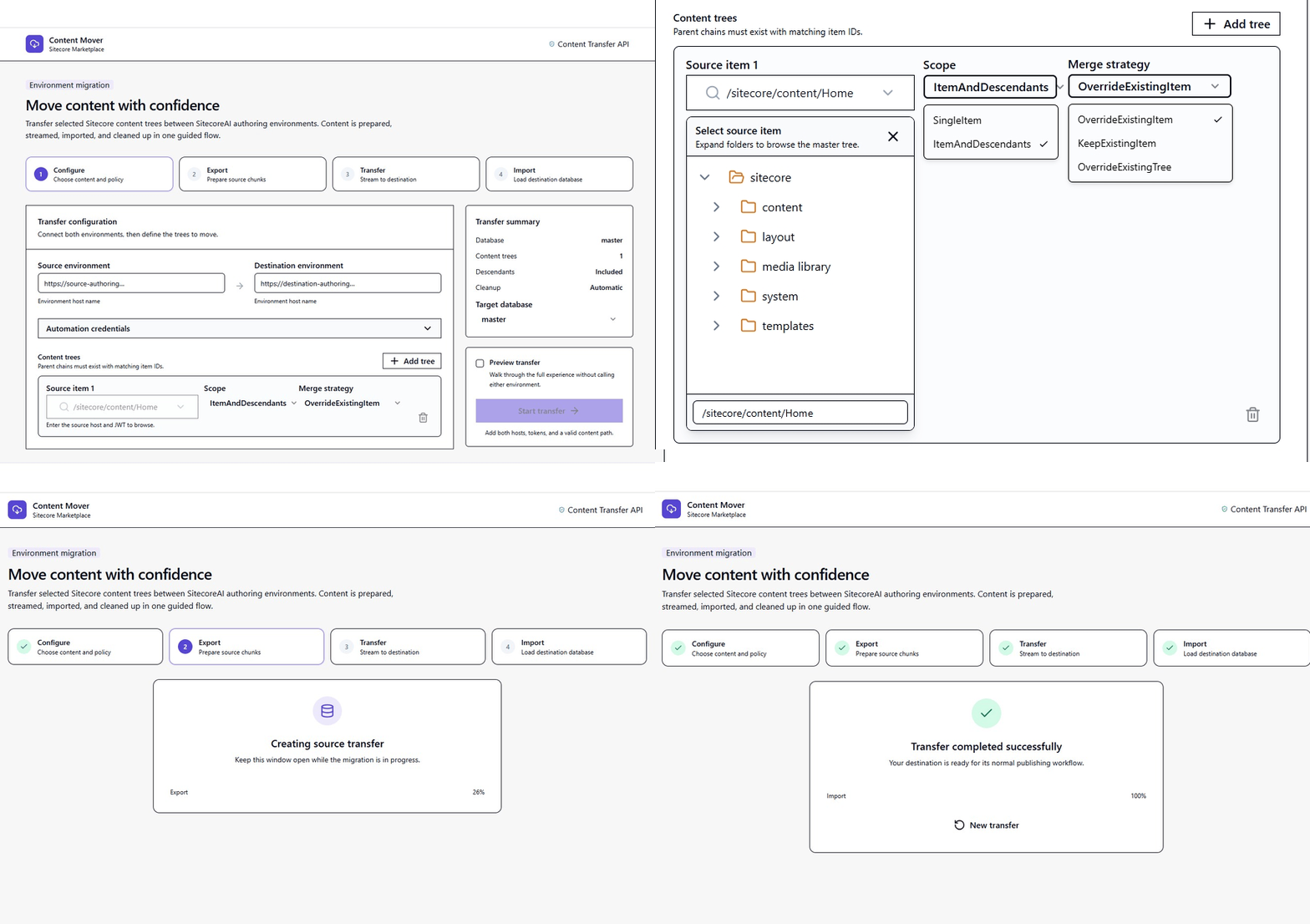
Users configure both environments before choosing content. JWTs should be treated as secrets and replaced when they expire.
Choose Content From a Sitecore-Style Tree
Instead of requiring users to remember and type item paths, the assistant loads the source hierarchy through the Authoring GraphQL API. Branches expand on demand, keeping the browser responsive even when an environment contains a large number of items.
Every selected content tree has two important choices:
- Scope: Transfer only the selected item, or include all of its descendants.
- Merge strategy: Override the existing item, keep the existing item, or override the existing tree.
Multiple roots can be added to the same transfer. For example, a team can select a campaign page under /sitecore/content and a related folder under /sitecore/media library.
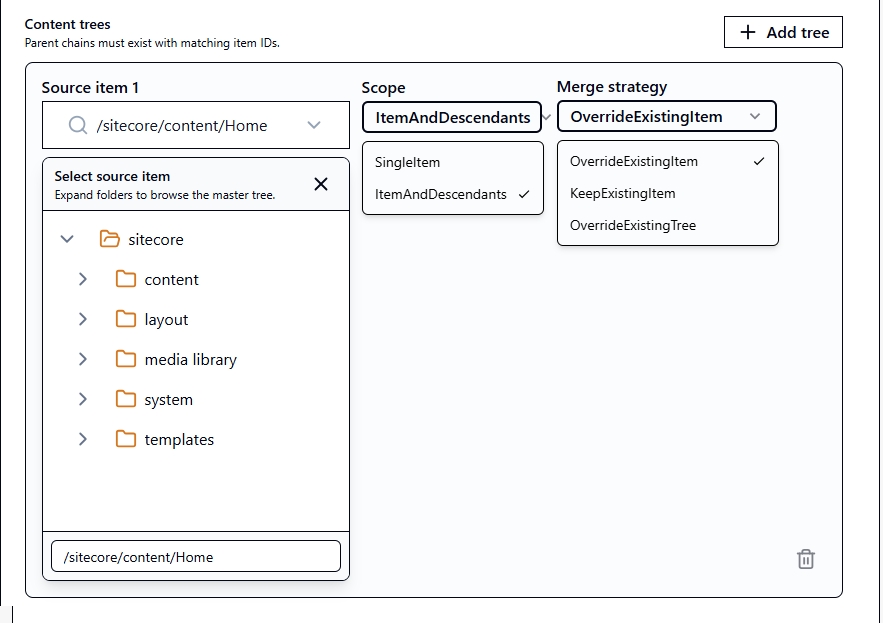
The selected paths become the DataTrees configuration sent to the Content Transfer API.
The Four-Step Transfer Workflow
Behind the single action button, the assistant coordinates four clear stages:
- Configure: Validate the environments, credentials, database, selected paths, scopes, and merge strategies.
- Export: Ask the source environment to package the selected Sitecore items and poll until the export is ready.
- Transfer: Stream the exported chunks to the destination without changing their binary contents, then complete the uploaded chunk set to produce a RAIF package.
- Import: Tell the destination to consume the RAIF package, find the resulting transfer job, and poll until Sitecore reports that it has finished.
The server cleans up temporary transfer data after the operation. Longer-running imports continue to be polled, so a normal Sitecore processing delay is not mistaken for an immediate failure.
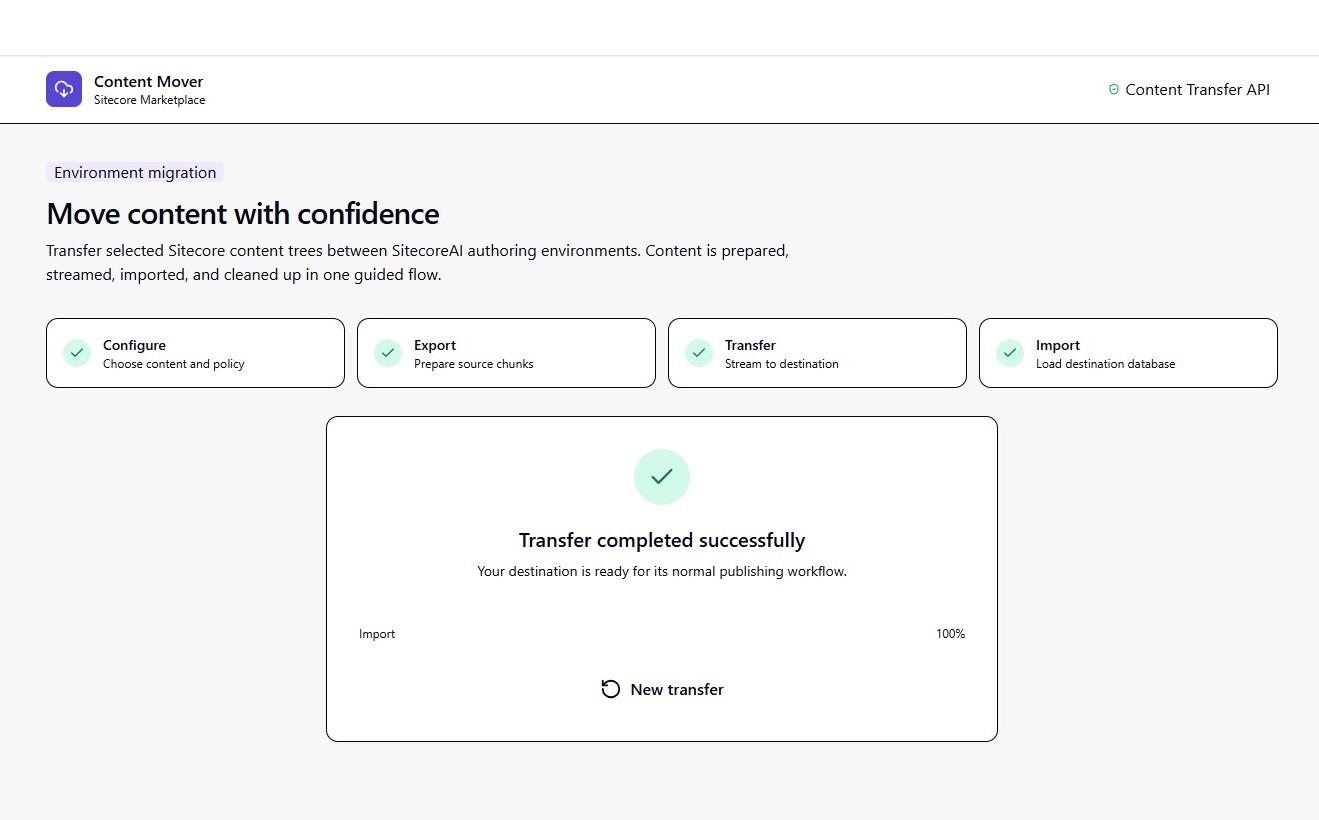
Progress and error messages expose the current phase, making failures easier to diagnose.
Why the RAIF Package Is Part of the Process
RAIF is the handoff format expected by Sitecore's destination-side Item Transfer APIs. The Content Transfer API exports content in chunks. After those chunks are uploaded, Sitecore completes them into a RAIF package. The destination then consumes that package and creates the import job.
The assistant hides this implementation detail from the user, but it cannot safely skip it. Sending raw item JSON or writing directly to the Sitecore database would bypass the supported import pipeline and its handling of item identity, fields, hierarchy, language, versions, and media binaries.
What Moves Automatically and What Does Not
A selected item moves according to its chosen scope. With ItemAndDescendants, its descendants are included automatically. References outside that selected subtree are not automatically discovered and added.
- Child pages and items: Included when the descendants scope is selected.
- Media: Included when the relevant media item or media folder is also selected.
- Templates, renderings, and supporting definitions: Select them explicitly if required, but normally manage solution-owned definitions with Sitecore Content Serialization and deployment.
- Referenced items elsewhere: Not included simply because a field points to them.
A useful rule: Transfer editorial content with this assistant. Deploy the structural definition of the solution through the team's normal serialization and release process.
Security and Operational Safeguards
Both environments require their own access token because export and import are separate authorized operations. Tokens should be created from Sitecore Cloud Portal automation credentials, exchanged through Sitecore's identity endpoint, kept out of source control, and refreshed when they expire.
The application also validates environment hostnames. Standard .sitecorecloud.io hosts are accepted, while additional trusted hosts can be declared through SITECORE_ALLOWED_HOSTS. This limits the proxy to intended Sitecore targets.
Preview mode gives teams another safeguard. It validates and displays the planned operation without starting the remote export and import, helping reviewers confirm paths and strategies before content changes.
What Content Teams Gain
- A guided alternative to manually assembling API requests.
- A visual item picker that reduces path-entry mistakes.
- Explicit scope and conflict behavior for every selected tree.
- One progress view across two environments and several Sitecore APIs.
- Clearer errors when credentials, endpoints, packages, or import jobs fail.
A Focused Assistant for Repeatable Content Promotion
Moving content between environments is a technical operation, but it should not require every user to understand transfer IDs, chunk sets, binary uploads, RAIF files, or polling endpoints. The Content Migration Assistant keeps those details in the application while giving users control over the decisions that matter: where content comes from, where it goes, what is included, and how conflicts are resolved.
The result is a more repeatable and understandable way to promote SitecoreAI content, using Sitecore's supported APIs and a UI that feels at home in the Sitecore ecosystem.
Future Enhancements: Growing Beyond the MVP
The current version focuses on the essential path-to-path transfer workflow. As the assistant evolves, future releases could add more governance, automation, and visibility without making the core experience harder to use.
Potential enhancements include:
- Pre-transfer dependency analysis: Identify referenced media, templates, data source items, and other dependencies that sit outside the selected content tree.
- Destination comparison: Show which items are new, changed, or already present before the import begins.
- Transfer history and audit logs: Retain who initiated each transfer, what was selected, when it ran, and whether it succeeded.
- Saved transfer profiles: Let teams reuse approved environment pairs, paths, scopes, and merge strategies for recurring releases.
- Scheduled transfers: Allow approved packages to run during a defined deployment or maintenance window.
- Approval workflows: Require a reviewer to approve production-bound transfers before the destination import starts.
- Notifications: Send completion or failure updates through email, Microsoft Teams, Slack, or release-management webhooks.
- Rollback assistance: Capture enough destination context to guide teams through recovery when an imported change needs to be reversed.
MVP first: These ideas are intentionally described as future enhancements. The current release remains focused on making supported SitecoreAI content transfers clear, controlled, and reliable.