



Introduction
SitecoreAI Search provides a powerful platform for managing and delivering searchable content. However, when content needs to be imported from external systems, applications, or structured data sources, managing the ingestion process can require additional development effort.
To simplify this process, I developed a custom SitecoreAI Search Ingestion Marketplace App that enables users to import external content into SitecoreAI Search push sources using CSV and JSON files.
The application provides a user-friendly interface to select a push source, map incoming data to the target index schema, preview records, and push content directly into SitecoreAI. It also provides functionality to identify and delete existing documents when they are no longer required.
What Does the Application Do?
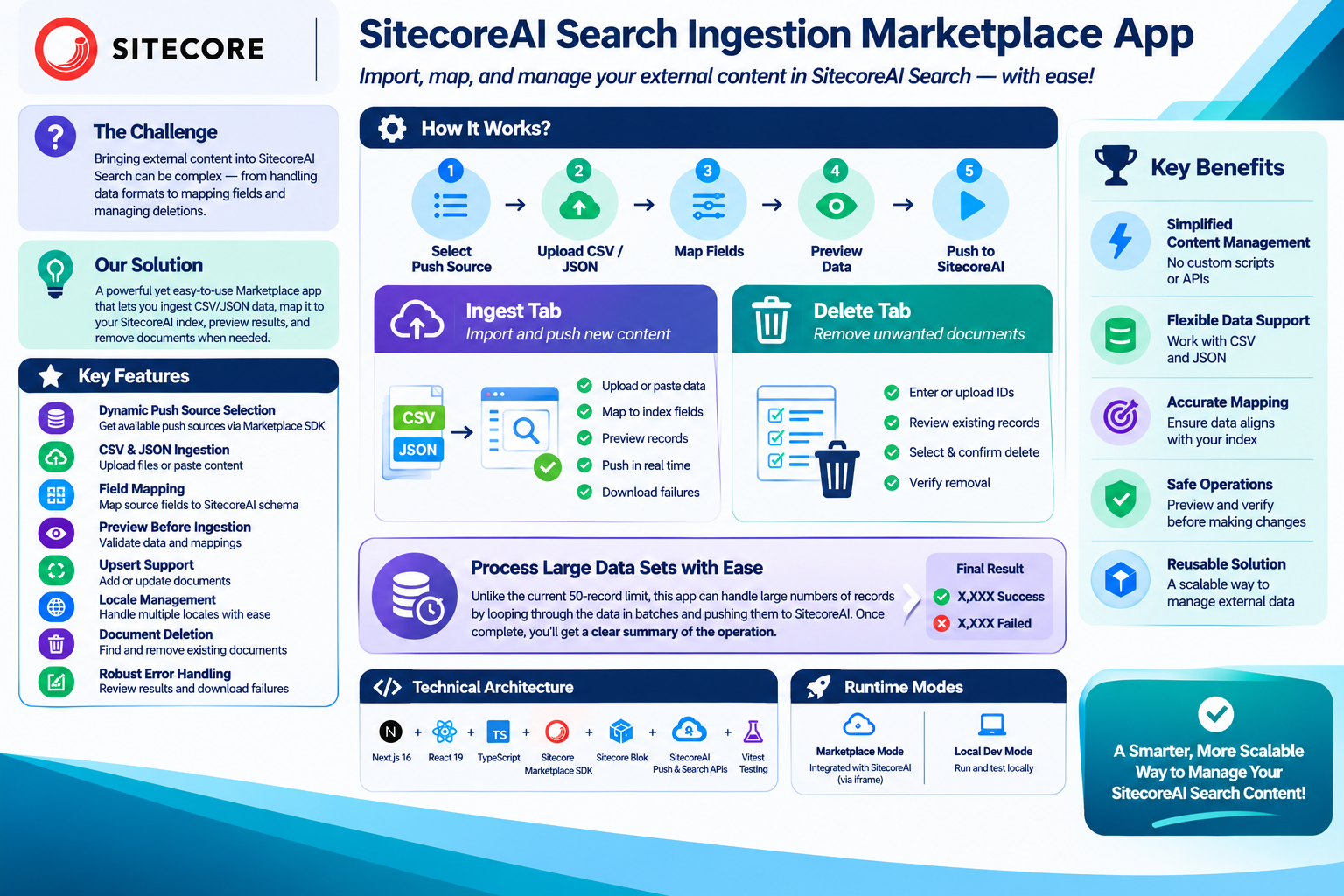
The application provides two primary functionalities:
- Ingest: Import external CSV or JSON data into a SitecoreAI Search push source.
- Delete: Identify and remove existing documents from a selected push source.
Instead of manually preparing API payloads or writing custom scripts for every import, users can perform these operations through a single interface.
Key Features
1. Dynamic Push Source Selection
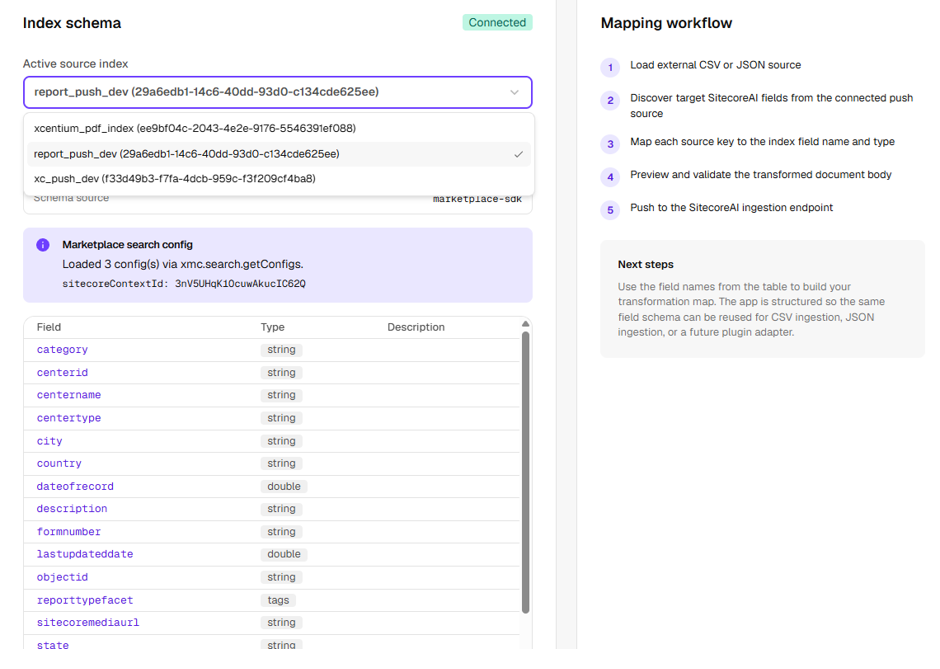
The application integrates with the Sitecore Marketplace SDK to retrieve Search Configuration information using xmc.search.getConfigs.
It dynamically identifies available push sources and displays them in a dropdown.
Once a source is selected, the application retrieves its configured fields and supported locales. This ensures that incoming content can be mapped against the actual schema of the selected push source.
Only push sources are displayed because these are the sources that support content ingestion through the Push API.
2. CSV and JSON Content Ingestion
The application supports two commonly used structured data formats:
- CSV file uploads.
- JSON file uploads.
Users can also paste CSV or JSON content directly into the application.
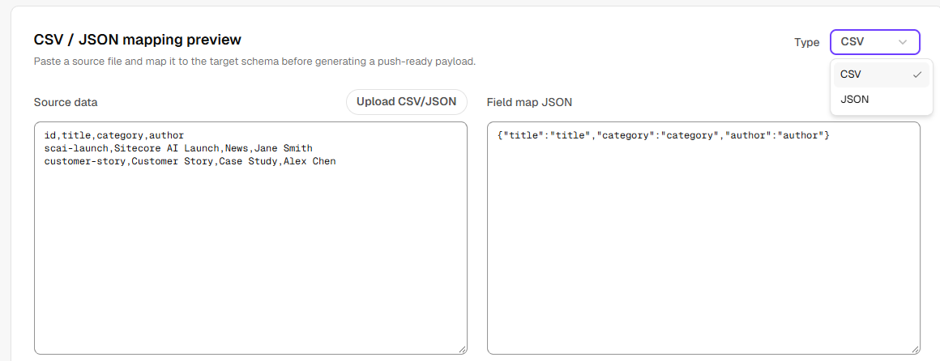
The ingestion process parses and normalizes the incoming data before preparing it for mapping.
This makes it easier to import content from external applications, data exports, and other content management systems.
3. Dynamic Field Mapping
One of the key features is the ability to map external data fields to the fields configured in a SitecoreAI push source.
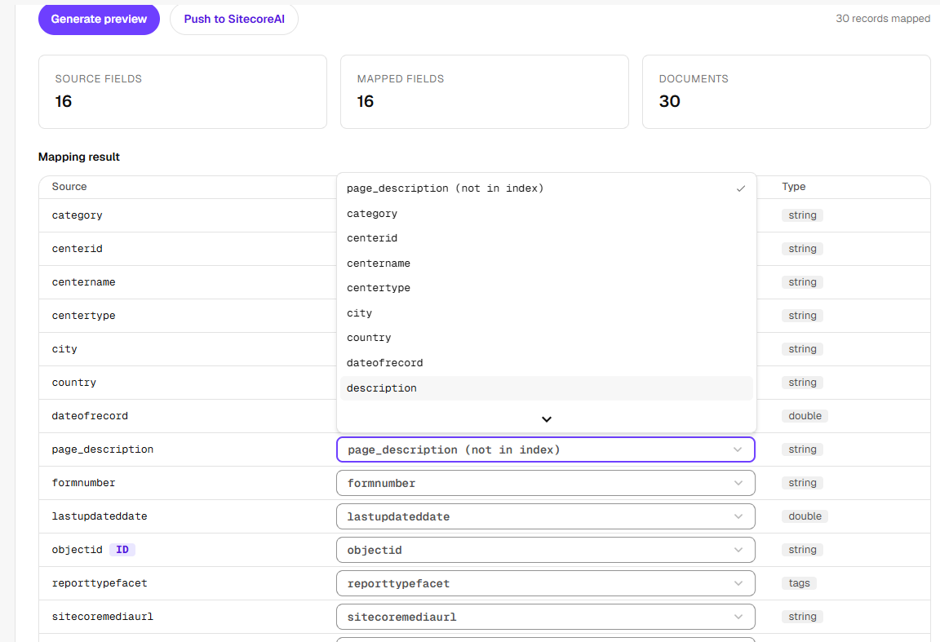
After selecting a source and uploading the data, the application generates a mapping interface.
Users can:
- View all incoming source fields.
- Select corresponding target fields from the selected push source.
- Modify field mappings using dropdowns.
- Manually edit the field mapping JSON when required.
- Regenerate the preview after changing mappings.
The application also validates the mapping and ensures that the generated payload aligns with the selected index schema.
4. Preview Before Ingestion
Before pushing content into SitecoreAI, users can generate a preview of the mapped documents.
This allows them to validate the transformed data and identify potential issues before submitting the records.
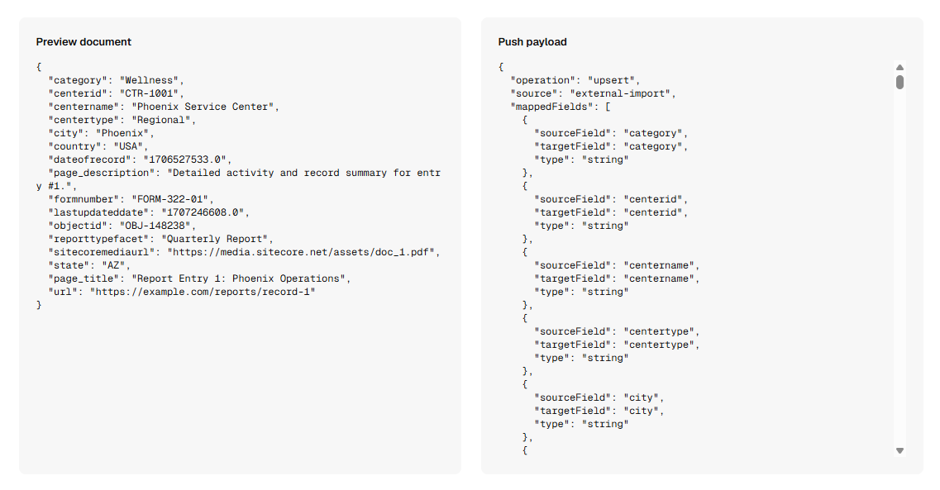
The application validates important aspects such as:
- Required document IDs.
- Duplicate ID and locale combinations.
- Field mappings.
- Data formatting.
- Locale compatibility.
If validation fails, the application displays the relevant errors and prevents the user from pushing an invalid payload.
5. Upsert Support: Add and Update Documents
The application uses the SitecoreAI Push Ingestion API to submit documents using the upsert operation.
The operation uses a combination of document ID and locale to identify the document.
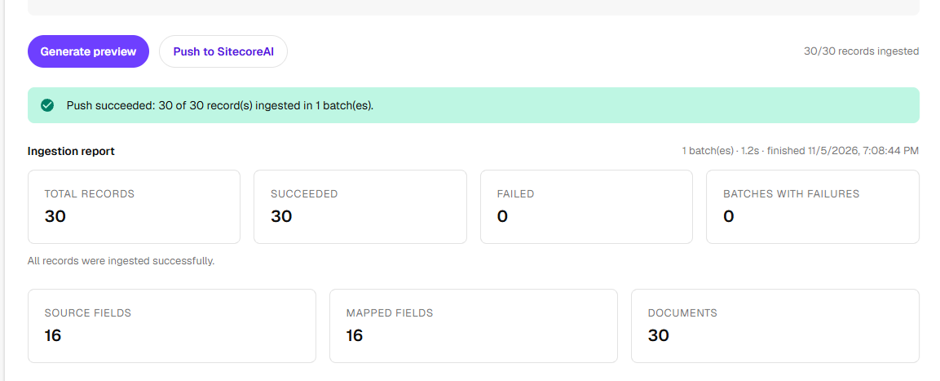
- If the document does not exist, SitecoreAI adds it.
- If a document with the same ID and locale already exists, SitecoreAI replaces the existing document.
Users can select the source column that should be used as the document ID. They can also configure an optional locale column or select a default locale.
This provides flexibility when importing data from different external systems.
While the current implementation restricts content pushing to batches of 50 records, the updated application processes larger volumes of data by iterating through the records in a loop. It then provides a summary report detailing the exact number of successful and failed operations.
6. Locale Management
The application dynamically retrieves the supported locales from the selected push source.
Users can select a default locale, which is used when the incoming data does not contain a locale value.
If the source data contains a locale column, the application uses the corresponding locale for each document.
It also validates locale compatibility and displays warnings when incoming records contain locales that are not configured on the selected push source.
This helps prevent avoidable ingestion failures.
7. Document Deletion
In addition to ingestion, the application provides a dedicated Delete tab for removing documents from a push source.
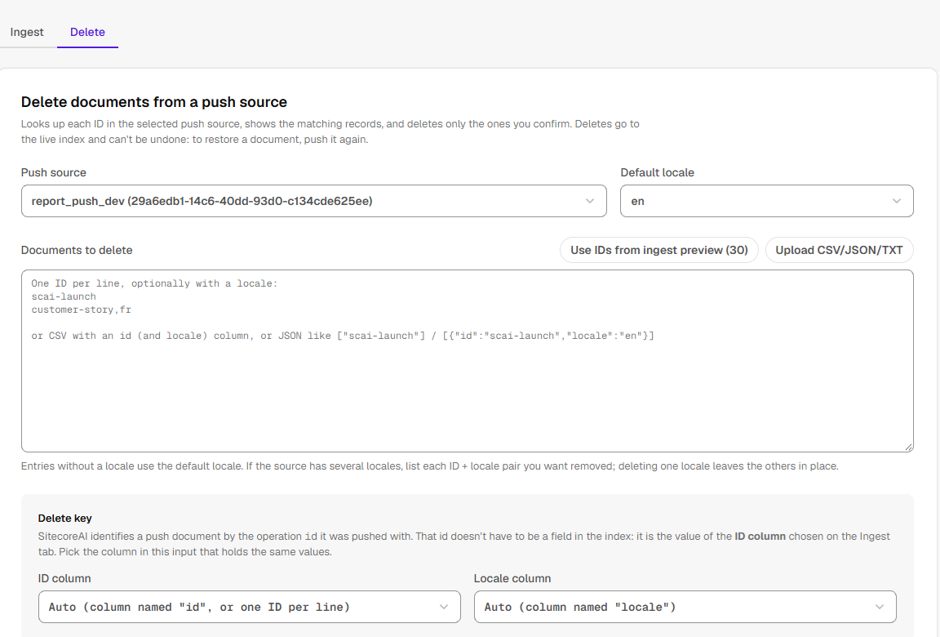
Users can provide document IDs through:
- Manual text entry.
- CSV uploads.
- JSON uploads.
- IDs generated from the current ingestion preview.
Before deletion, the application checks which documents actually exist in the selected index.
Users can review the matching records, including their available details, and select the documents they want to delete.
A confirmation step requires users to type DELETE before proceeding.
After submitting the deletion request, the application provides a deletion report and performs another lookup to verify whether the documents have disappeared from the index.
This additional verification is important because an accepted delete operation does not necessarily mean that a matching document was removed.
8. Error Handling and Operation Reports
The application includes validation and error-handling mechanisms throughout the ingestion and deletion workflows.
Users can review:
- Successful operations.
- Failed operations.
- Validation errors.
- Documents that could not be found.
- Deletion verification results.
For failed ingestion records, users can download a CSV containing the failures for further investigation.
This makes troubleshooting easier, particularly when working with large datasets.
Technical Architecture
The application is developed using the following technologies:
- Next.js 16: Application framework.
- React 19: User interface.
- TypeScript: Application development.
- Sitecore Marketplace SDK: Integration with the SitecoreAI host and Search Configuration API.
- Sitecore Blok: UI components and design system.
- SitecoreAI Push Ingestion API: Document ingestion and deletion.
- SitecoreAI Search API: Document lookup and deletion verification.
- Vitest: Unit testing.
The application follows a modular architecture, separating UI components, ingestion logic, configuration handling, API communication, and document lookup functionality.
Marketplace Integration
An important aspect of the implementation is supporting both Marketplace and local development environments.
The application automatically detects its runtime environment.
Marketplace Mode
When opened inside SitecoreAI, the application connects to the host using the Marketplace SDK. It retrieves the Sitecore context, accesses the Search Configuration API through the host, and dynamically loads push source metadata, fields, and locales.
Local Development Mode
When running locally, the application can retrieve configuration through server-side API calls or use local fallback configuration files for development and testing.
This approach allows developers to work on the application independently while maintaining the required integration when deployed inside SitecoreAI.
Understanding the Ingestion Workflow
The overall ingestion process follows these steps:
- Select a SitecoreAI push source.
- Upload a CSV/JSON file or paste the data.
- Parse and normalize the incoming records.
- Retrieve the selected push source schema.
- Map external fields to SitecoreAI fields.
- Configure document IDs and locales.
- Generate and validate the preview.
- Build the final push payload.
- Submit the records through the SitecoreAI Push Ingestion API.
- Review the operation report and download failed records if required.
Important Considerations
A few important implementation details are worth highlighting:
- Push sources and their field definitions must be created and published through the SitecoreAI UI. The application reads existing configuration but does not create or modify push source schemas.
- The Push Ingestion API supports both upsert and delete operations through the same endpoint, using different operation actions.
- Deletion requires the document ID and locale, where applicable.
- The application checks document existence through the Search API because the ingestion API is write-oriented.
- Document deletion and index visibility may not be immediate, so verification may require another lookup.
- Original import files should be retained because push sources do not maintain a separate list of all submitted documents.
Conclusion
Developing this Marketplace application was an opportunity to simplify the process of managing external content within SitecoreAI Search.
By combining the Sitecore Marketplace SDK, Search Configuration API, Push Ingestion API, and Search API, the application provides a centralized interface for importing, mapping, validating, and deleting documents.
The solution reduces the need for manual API interactions and provides a reusable approach for integrating external structured data with SitecoreAI Search.
It also establishes a foundation that can be extended with additional ingestion formats, automation capabilities, and other content management workflows in the future.