



There are two ways to work with Sitecore AI when editing content: the regular Content Editor and the newer, visual Page Builder. Editors who have used Sitecore since its on-premises days may still tend to use Content Editor. As organizations increase adoption of Page Builder, they may want better visibility into how frequently each authoring experience is being used.
What the App Does
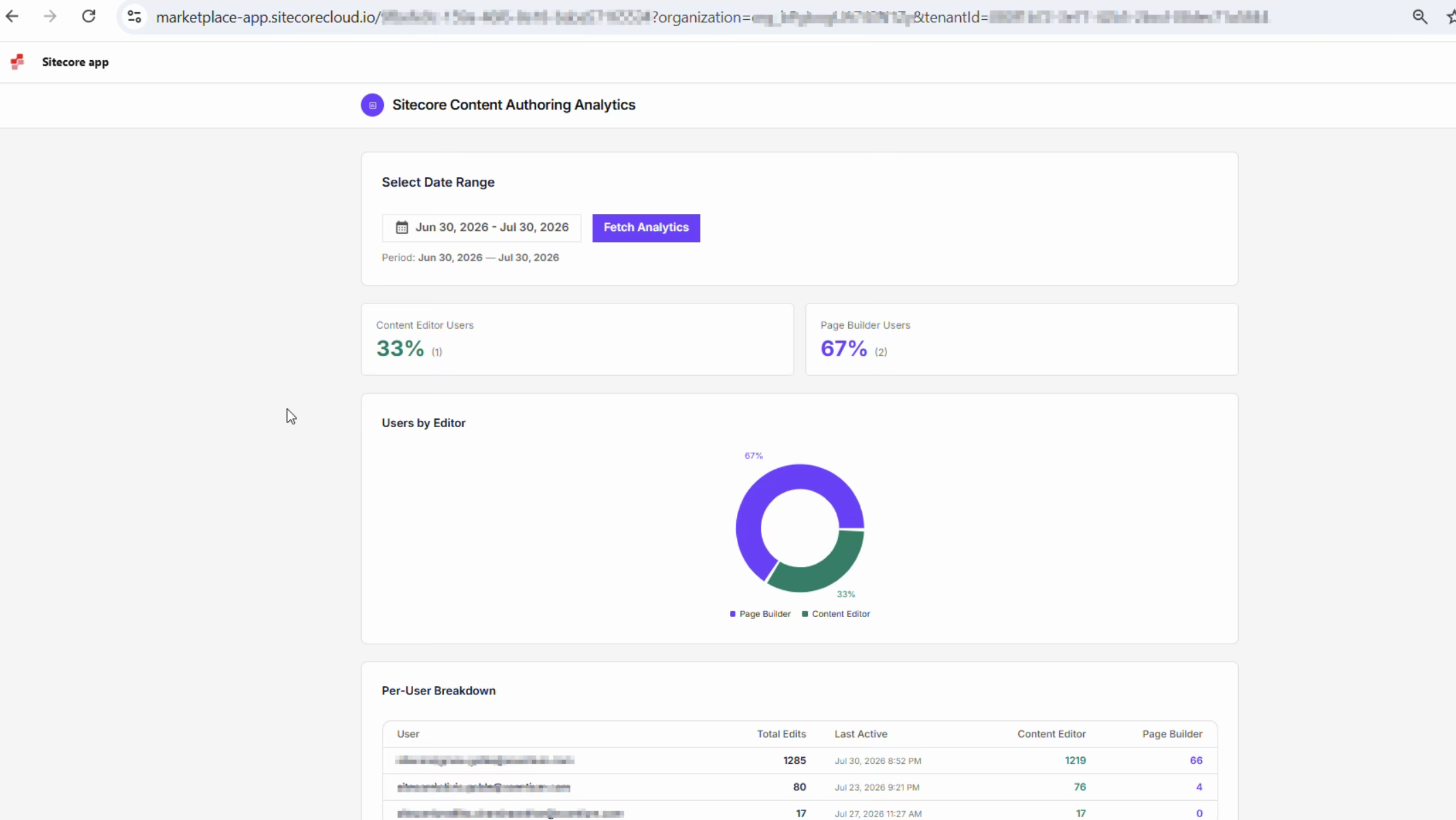
This Sitecore Marketplace app opens directly inside the Sitecore Portal alongside your other apps. Select a date range, and the app shows you:
- A simple percentage split between Content Editor usage and Page Builder usage.
- A per-user breakdown showing who was active, how many items they touched, and when they were last active.
There is no setup beyond installing the app and signing in. The breakdown is generated on demand from your environment's own activity.
How It Works, at a Glance
Under the hood, three pieces work together. This section focuses on the overall shape of the system rather than implementation details, providing useful context for understanding what each part is responsible for.
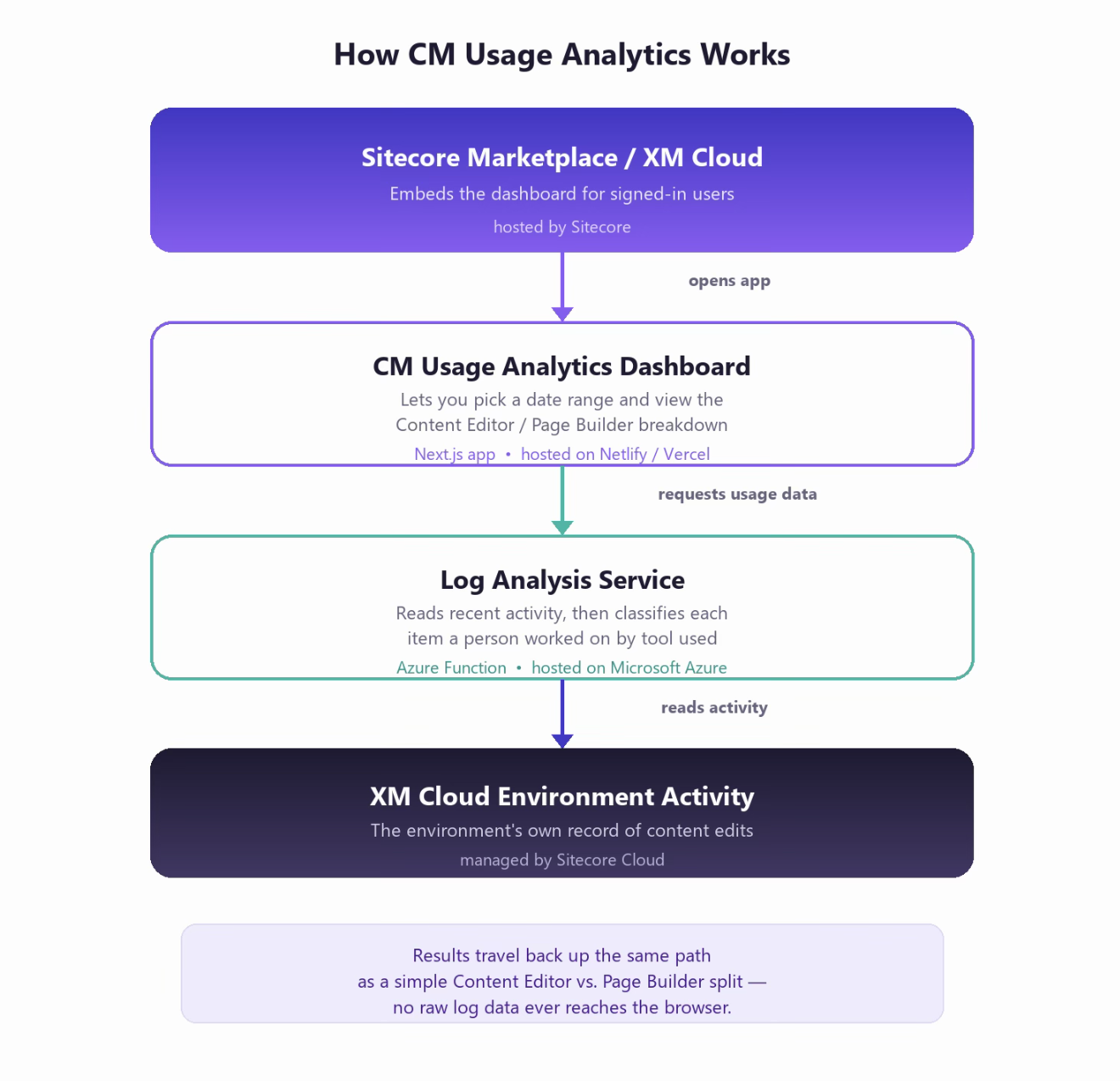
High-level request flow, from opening the app to seeing a result
The dashboard itself is a lightweight web application and does not perform the heavy processing on its own. When you choose a date range, it asks a separate, purpose-built service, the Log Analysis Service, to do the actual work. The service reads the environment's activity records for that period and determines, item by item, which editor was used.
The dashboard's role is to ask the question and present the answer clearly as a chart and a table instead of a wall of raw log data.
Keeping these responsibilities separate also keeps the Marketplace app simple and fast. The component that communicates with Sitecore's log infrastructure runs independently and can be scaled, updated, or redeployed on its own schedule.
Where Everything Runs
Each piece is hosted where it makes the most sense:
| Component | Hosted on | Role |
|---|---|---|
| Sitecore Marketplace | Sitecore-managed | Embeds the dashboard and handles sign-in for anyone opening the app from the Portal. |
| CM Usage Analytics Dashboard | Netlify / Vercel | The Next.js web application, the screens you actually interact with. |
| Log Analysis Service | Microsoft Azure | An Azure Function that reads environment activity and produces the Content Editor / Page Builder breakdown. |
Configuration Reference
For anyone setting up or maintaining a deployment, each part of the system requires environment-specific configuration. The values themselves are kept out of source control. The following components make up the deployment:
Dashboard: Next.js app
| Variable | Purpose |
|---|---|
| NEXT_PUBLIC_AUTH0_DOMAIN | Identity domain used to sign users in outside the Marketplace. |
| NEXT_PUBLIC_AUTH0_CLIENT_ID | Public client ID for that sign-in flow (SPA Client Credentials from Marketplace). |
| NEXT_PUBLIC_AUTH0_AUDIENCE | The Sitecore API audience the sign-in flow requests. |
| NEXT_PUBLIC_AUTH0_SCOPE | Requested permission scopes for that sign-in. |
| NEXT_PUBLIC_SITECORE_APP_ID | This app's registered Marketplace App ID. |
| NEXT_PUBLIC_SITECORE_ORGANIZATION_ID | The Sitecore organization the app is installed under. |
| SITECORE_TENANT_ID | Reference to the Sitecore AI environment (used outside the embedded context). |
| SITECORE_CONTEXT_ID | Preview context used only when the app is opened outside the Marketplace. |
| LOG_ANALYSIS_FUNCTION_URL | Address of the Log Analysis Service. |
| LOG_ANALYSIS_FUNCTION_KEY | Access key used to call the Log Analysis Service securely. |
Log Analysis Service: Azure Function
| Variable | Purpose |
|---|---|
| SitecoreEnvironmentId | Which Sitecore AI environment to read activity from. |
| SitecoreDeployClientId | Service credential used to authenticate with Sitecore Cloud. |
| SitecoreDeployClientSecret | Secret paired with that service credential. |
| AzureWebJobsStorage | Standard Azure Functions runtime storage connection. |
| FUNCTIONS_WORKER_RUNTIME | Tells Azure this Function runs on .NET (isolated worker model). |
| SitecoreCliKeepTempFiles (optional) | Keeps temporary working files for troubleshooting; off by default. |
| SitecoreCliProjectDir (optional) | Overrides where supporting files are located; not needed in a normal deployment. |
Why This Approach
The guiding idea behind Content Authoring Analytics is that understanding tool adoption should not require exporting logs and building a spreadsheet. By reading the environment's own activity and performing the classification behind the scenes, the app provides usage analytics for Page Builder and Content Editor in just a few clicks.

Contact Us
Content Authoring Analytics provides a practical way to measure Sitecore Page Builder adoption across your organization. For more information about configuring and using this Marketplace application, please contact XCentium at debabrata.biswas@xcentium.com.