



The shift toward building websites for AI agents, not just human visitors, is moving faster than anything I have seen. It reminds me of the rise of responsive design around 2010, when companies had to start designing for mobile users alongside desktop users. At the time, that shift felt significant, but most organizations still took years to invest in responsive or truly mobile-first experiences.
This shift is bigger, and it is moving much faster. Responsive design was mainly a layout challenge: adapting the page to fit different screen sizes. AI visibility is different. It introduces a new audience for your website: AI bots that need to understand, navigate, and act on your site without relying on a human-facing interface.
This requires a full reconsideration of the ability to search, compare, and complete a purchase on your site without a human ever touching a mouse. That is like building a new highway, with its own traffic, its own rules, and its own expectations.
From AEO/GEO to the Agentic Web
AEO (Answer Engine Optimization) and GEO (Generative Engine Optimization) are SEO's successors, and most brands are still catching up. In simpler terms, they are SEO for AI visibility. Most of the marketers and architects I talk to are already deep into conversations about how they can improve their AEO and GEO scores.
WebMCP is the next link in that chain, and I do not think enough people are connecting the two. AEO and GEO are about getting an AI agent to notice your brand and your pages, and to pull your content into its answer. WebMCP is about what happens the moment after that: once an agent has decided you are relevant, can it actually do anything on your site? Can it search your inventory, apply a filter, or complete a checkout?
If the answer is no, you may have won discovery but lost the transaction, and that is the costlier failure.
What WebMCP Actually Changes
Google Chrome Labs built a simple demo to make the case, and it is the best explanation I have seen. A person looks at a page and sees a "Book Flight" button. They understand it instantly and click it. An AI agent looking at the same page sees none of that context. It sees a wall of HTML that it has to pick apart, guess at, and re-check every time the page changes. What takes a person one click can take an agent a dozen expensive token-consuming round trips.
Here is the part that should matter to every marketer and technical architect reading this: the website already knows the answer. Your code already knows which function handles search and which one handles checkout. That logic has always existed. It has just been locked behind a visual interface built only for human eyes.
WebMCP does not ask you to build new capability. It asks you to expose what you have already built, on purpose, with a name, a set of inputs, and a clear description of when to use it.
How WebMCP Works
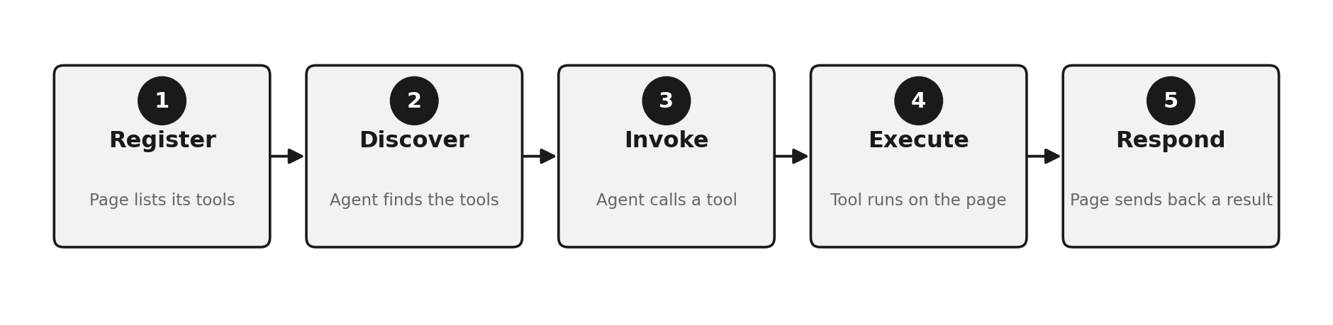
Functionally, WebMCP is simple enough to explain in five steps:
- Register: The page lists its tools.
- Discover: The agent finds the available tools.
- Invoke: The agent calls the tool it needs.
- Execute: The tool runs on the page using the site's own logic and interface.
- Respond: The page sends back a clear result.
It means your brand, your design, and your business rules stay intact even when a machine is doing the driving.
Why I'm Taking This Seriously
I want to go back to the responsive design comparison, because I think it is the most useful lens here. Responsive design was an obvious idea in 2010, and it still took most companies years to actually act on it because nothing forced their hand. There was no infrastructure push and no major platform making the decision for them.
WebMCP is still in beta, but it already has support from Google, Cloudflare, and Microsoft. Chrome and Microsoft Edge are actively working together on the browser-side standard. In August 2026, Cloudflare, which sits in front of a large share of the web, released a one-click way to enable it. When Google, Microsoft, and Cloudflare move in the same direction within the same year, it is time to stop treating WebMCP as a concept and start treating it as a roadmap item.
What This Means, Depending on Your Seat
If you are in marketing, the uncomfortable truth is that your funnel now has a version that does not see your homepage, your hero image, or your carefully written value proposition. It goes straight to the transaction. Your job is not just to be found by real people anymore. It is also to make sure the agent finds the right tool and is able to use it on the customer's behalf.
If you are in architecture, the uncomfortable truth is different: this is a new, agent-facing surface on your site, and it deserves the same rigor you would give a public API. The moment you expose a tool, someone will try to abuse it. While the WebMCP landscape itself is evolving, technical risks such as prompt injection, fake or tampered tools, and data leaks need careful vetting and design.
Where to Start
If I were advising a client this week, I would tell them to do three things: pick one high-value customer journey, such as search or checkout, rather than your whole site, and sketch out what a well-scoped tool for it would actually look like. Get your architects reading Chrome's trial documentation and treat Cloudflare's tool packs as a legitimate shortcut.
The Pace Is the Story
We are having conversations about AEO/GEO and MCP with every one of our clients right now. That pace alone tells me this is not a shift we get to sit out. If you want to talk through what it means for your roadmap, this is a conversation we're glad to have.